Categories
Chrony DIY homelab Linux NTP PTP Raspberry Pi

From Milliseconds to 26 Nanoseconds: How a $20 eBay SFP Module Beat My Entire NTP Setup

Welcome to Austin’s Nerdy Things, where we spend years chasing nanoseconds that nobody asked us to chase.

Five years ago, I started this blog by building a microsecond-accurate NTP server with a Raspberry Pi and PPS GPS. Then I went simpler – a $12 USB GPS for millisecond-accurate NTP because ease of use matters too. Then I spent months doing thermal management on the CPU to squeeze out another 81% improvement. My beloved Raspberry Pi 3B has been sitting at around +/- 200 nanoseconds for over a year now, and I figured that was about as good as it gets for consumer hardware.

A $20 eBay purchase from two years ago just demolished all of that.

The Hardware: Telecom Surplus for Pocket Change

The key piece is an Oscilloquartz OSA-5401 – a GPS-disciplined PTP grandmaster clock in an SFP form factor. These things were designed to plug into telecom switches and provide IEEE 1588 Precision Time Protocol timing for cellular networks. They have a built-in GPS receiver, an OCXO (oven-controlled crystal oscillator), and an FPGA that handles hardware PTP timestamping. New, they cost thousands of dollars. On eBay, a handful of decommissioned units went for $20. Now they’re unavailable. If they do appear (rarely), they’re $300-500.

I first spotted these on a ServeTheHome forum thread back in 2024. Someone found a batch on eBay for $20 each and I jumped on one. The firmware doesn’t include the NTP server feature from the spec sheet (that requires a license), but it spews PTP multicast frames on power-up – and that turns out to be all you need. I posted the first working PTP+chrony config in that thread, which others used as a starting point.

Mine was flaky from the start – the antenna would intermittently disconnect. I reported in the thread that “wiggling the module helped,” which in retrospect should have been a bigger clue. When I finally pulled the board out of the SFP housing, I found the GNSS SMA connector had broken loose from the PCB – probably cracked during decommissioning. A few minutes with a soldering iron fixed that, and it’s been rock solid since. Here’s the board with the resoldered connector, screwdriver bit for scale:
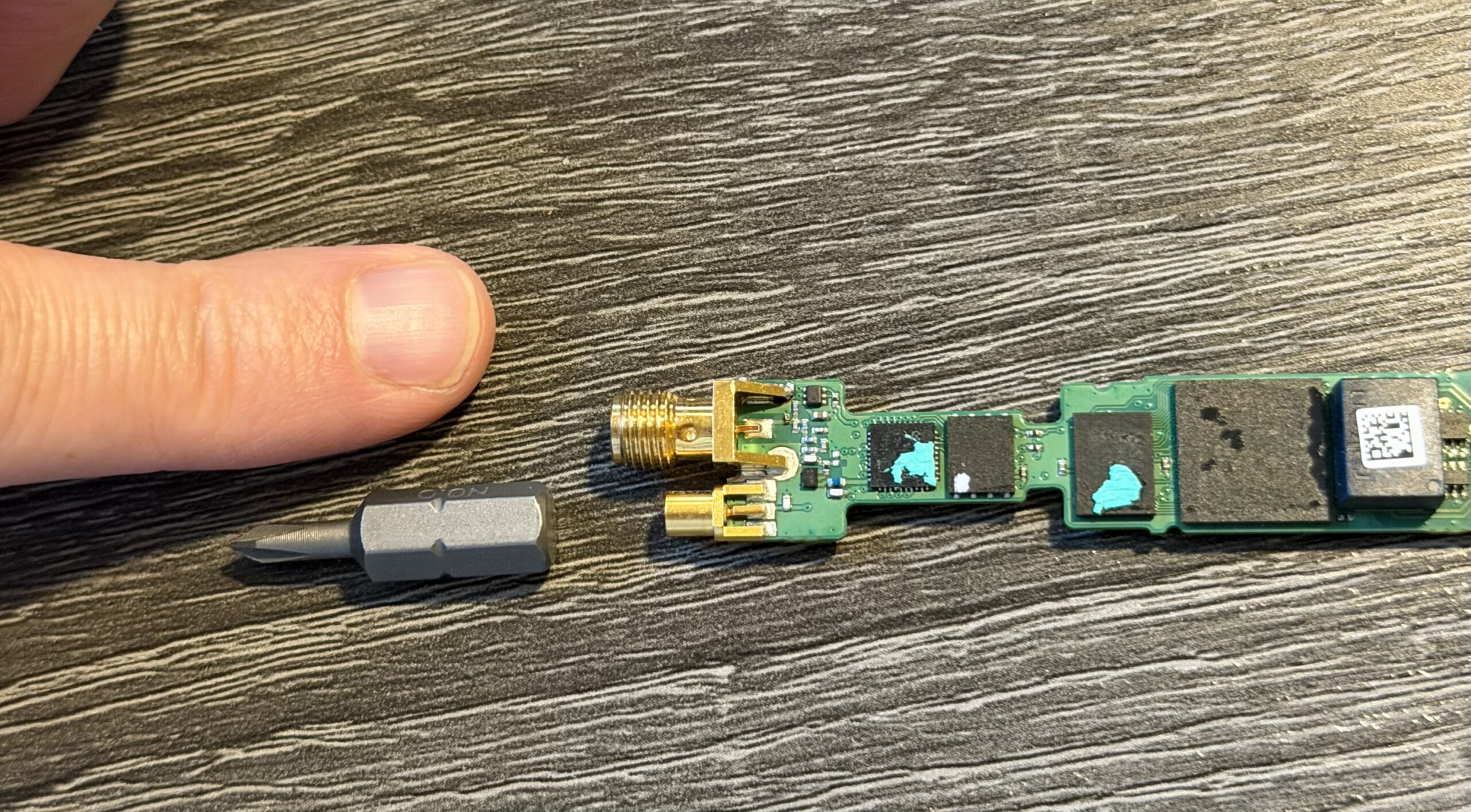
OSA-5401 PCB with resoldered GNSS SMA connector, screwdriver bit for scale

And installed in port F2 of a Brocade ICX6430-C12 switch, GPS antenna connected:
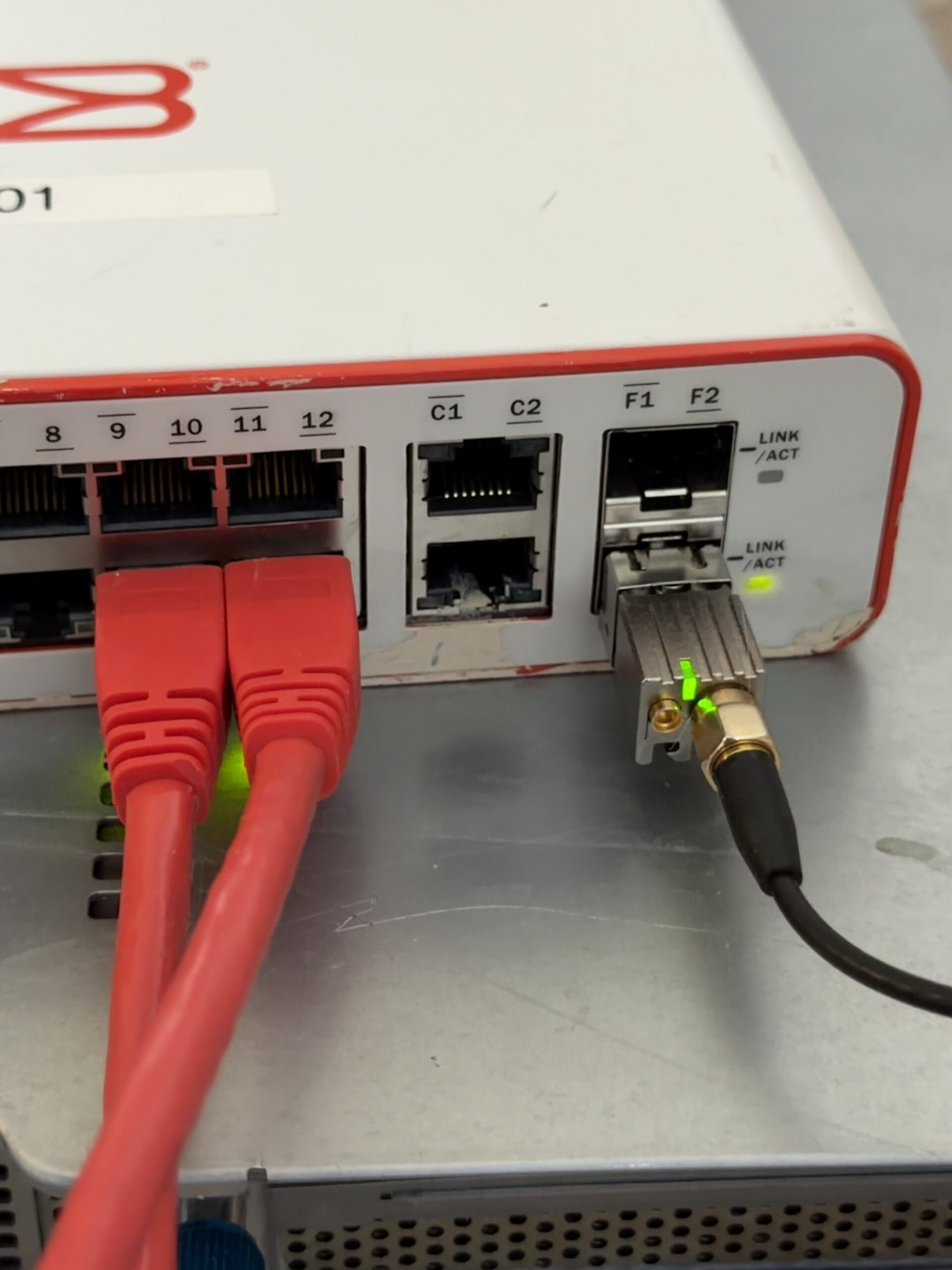
OSA-5401 installed in a Brocade ICX6430-C12 SFP port with GPS antenna

I also have a BH3SAP GPSDO that I picked up for about $70 on eBay – one of those Chinese units with an OX256B OCXO and an STM32 Blue Pill microcontroller. There’s a great thread on EEVBlog about these. I soldered some jumper wires to the MCU PPS output and connected it to GPIO 18 on my Raspberry Pi 5. I’ve been running custom firmware on it (based on fredzo’s gpsdo-fw) with some modifications for telemetry and flywheel display.

The whole mess wired together – GPSDO PPS jumper wires running to the Pi 5’s GPIO header:
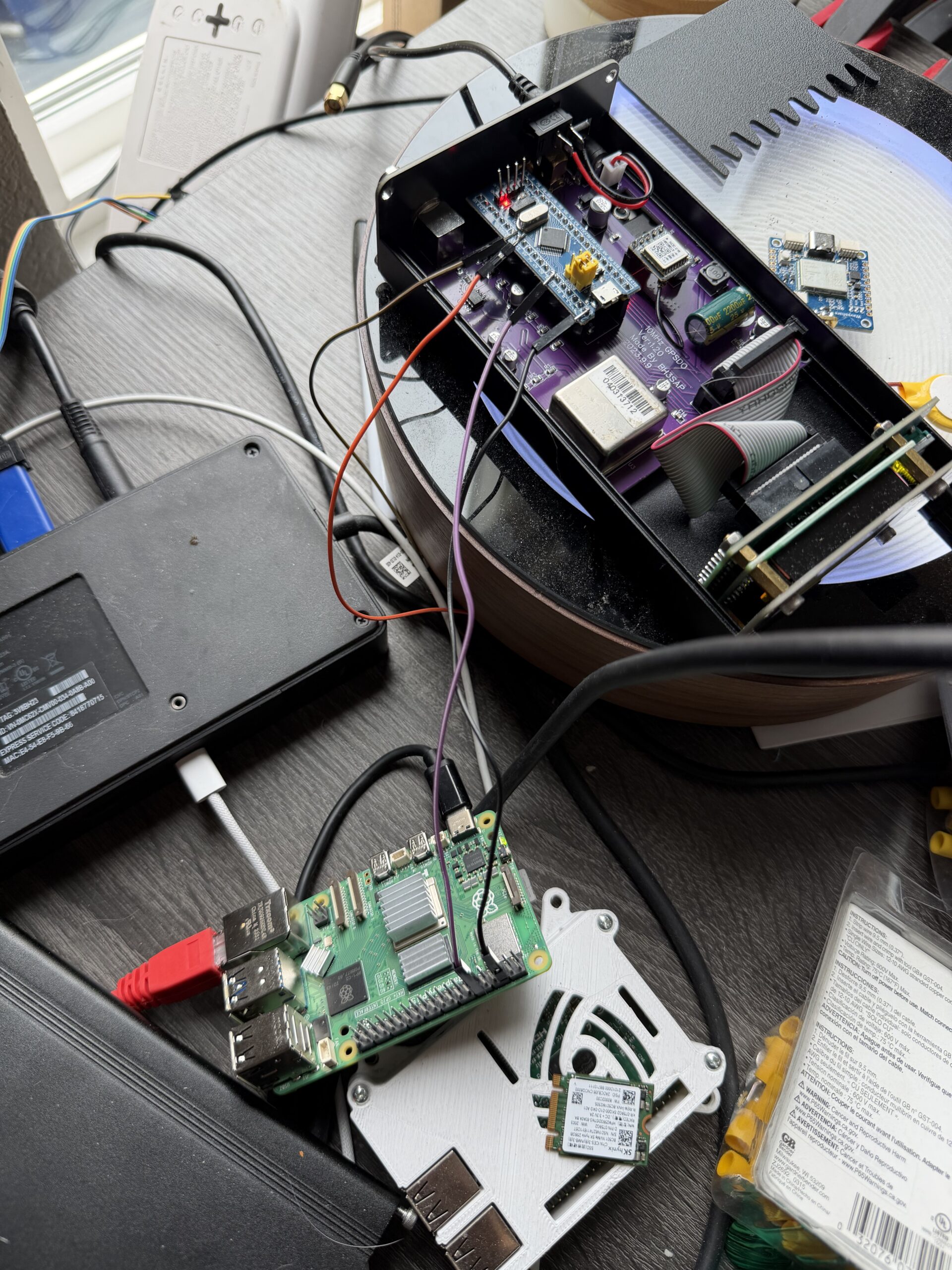
GPSDO connected to Raspberry Pi 5 via PPS jumper wires

The Raspberry Pi 5 has hardware timestamping on its Ethernet NIC, which gives it a /dev/ptp0 PTP hardware clock (PHC). This is critical – without hardware timestamping, PTP is no better than NTP. The Pi 5’s Ethernet controller supports it natively.

Here’s the setup:

  • OSA-5401 ($29) – GPS-disciplined PTP grandmaster, plugged into an SFP port on my network switch
  • BH3SAP GPSDO (~$70) – GPS-disciplined OCXO, PPS output wired to Pi 5 GPIO
  • Raspberry Pi 5 – running ptp4l (for PTP) and chronyd (for everything else)
  • Total cost of timing hardware: ~$100

The Software Stack

The timing chain has two hops:

  1. ptp4l receives PTP sync messages from the OSA-5401 over Ethernet and disciplines the Pi’s PTP hardware clock (/dev/ptp0)
  2. chrony reads the hardware clock as a refclock and disciplines the system clock

ptp4l configuration (/etc/linuxptp/ptp4l-osa.conf):

[global]
slaveOnly		1
domainNumber		24
network_transport	L2
time_stamping		hardware
delay_mechanism		E2E
clock_servo		pi
logging_level		6
summary_interval	0

twoStepFlag		1
first_step_threshold	0.00002
step_threshold		0.0
max_frequency		900000000
sanity_freq_limit	200000000

ptp_dst_mac		01:1B:19:00:00:00
p2p_dst_mac		01:80:C2:00:00:0E

[eth0]

The chrony refclock configuration for PTP (/etc/chrony/conf.d/ptp-osa.conf):

# OSA-5401 via ptp4l -> PHC0
# ptp4l disciplines /dev/ptp0 to PTP timescale (TAI)
# tai lets chrony apply the current TAI-UTC offset from its leap second table
refclock PHC /dev/ptp0 refid PTP dpoll -4 poll 0 filter 5 precision 1e-9 tai

A few things worth noting:

  • tai tells chrony the PHC is on TAI timescale and to automatically apply the current TAI-UTC offset (currently 37 seconds). This is better than hardcoding offset -37 because it auto-updates if a leap second is ever announced again.
  • dpoll -4 means chrony reads the PHC 16 times per second. I initially had this at dpoll 0 (once per second), but a tcpdump revealed the OSA-5401 is actually sending PTP sync messages at 16 Hz, not 1 Hz. So there’s fresh data to read.
  • filter 5 takes the median of 5 consecutive reads, rejecting outliers.
  • precision 1e-9 tells chrony the refclock is accurate to 1 nanosecond, which tightens the error bounds that chrony uses in source selection.

The Bug: Why Chrony Refused to Use the Better Source

When I first got this all running, I had both PPS (from the GPSDO) and PTP (from the OSA-5401) configured as refclocks. The GPSDO had lost GPS lock overnight and had been flywheeling for about 12 hours. PTP was clearly the better source – lower jitter, independent GPS reference. But chrony stubbornly stayed on PPS.

Here’s what chronyc sources showed:

MS Name/IP address         Stratum Poll Reach LastRx Last sample
===============================================================================
#* PPS                           0   2   377     5   -114ns[ -132ns] +/-  101ns
#x PTP                           0   2   377     3    -59us[  -59us] +/-  101ns

PPS was selected (*) and PTP was marked x – “may be in error.” But PTP wasn’t in error. The GPSDO had drifted 59 microseconds during 12 hours of flywheel, and chrony was faithfully following it off a cliff.

The culprit was in the PPS refclock config:

refclock PPS /dev/pps0 refid PPS dpoll 0 poll 2 filter 3 precision 1e-7 prefer trust

That trust flag is nuclear. It tells chrony: “this source is always correct – never classify it as a falseticker.” Combined with prefer, chrony would choose PPS no matter how much every other source disagreed with it. Three sources (PTP, pi-ntp, pfsense) all agreed the system clock was off by ~59 μs, but chrony trusted PPS absolutely and marked PTP as suspicious instead.

The fix was simple: remove trust. And after some more testing, remove prefer too. Let chrony’s selection algorithm do its job. As soon as I did that:

MS Name/IP address         Stratum Poll Reach LastRx Last sample
===============================================================================
#- PPS                           0   2    17     1    +59us[  +59us] +/-  101ns
#* PTP                           0   2    37     2    +22ns[  -83ns] +/-   18ns

PTP immediately took over. PPS correctly demoted to - (valid but not selected), showing +59 μs offset – the accumulated GPSDO flywheel drift.

Here’s the full day of refclock data. The top panel is in microseconds – you can see PTP sitting at +60 μs the whole morning because the system clock was following the drifting GPSDO. Then the fix lands around 08:30 MDT and everything snaps into place. The bottom panel zooms into the post-fix period in nanoseconds:
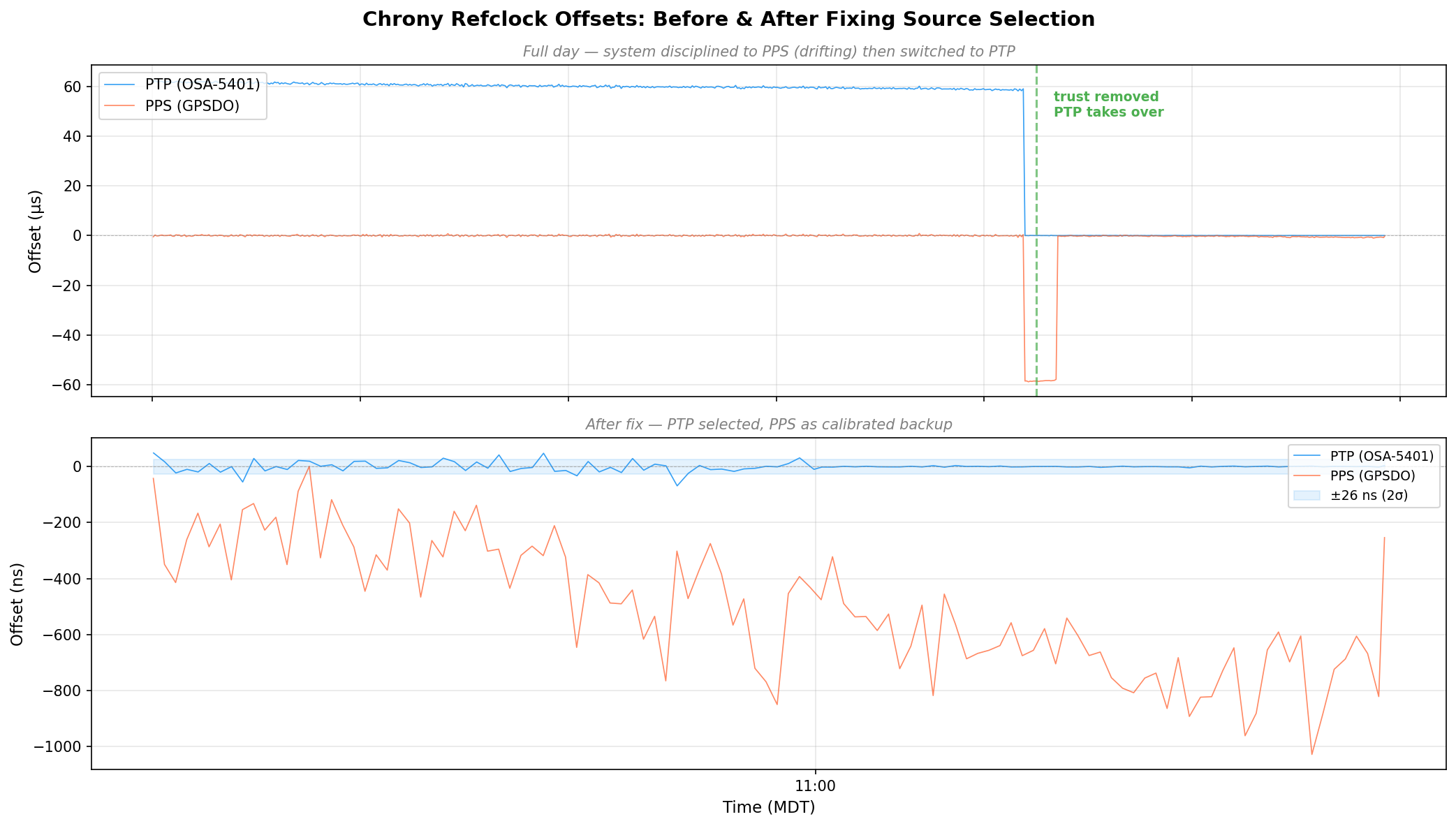
Chrony refclock offsets before and after fixing source selection - PTP drops from 60μs to near-zero
Chrony refclock offsets before and after fixing source selection – PTP drops from 60μs to near-zero

Discovering the 58.3 Microsecond MCU Bias

Once the GPSDO regained GPS lock, I expected PPS to converge back toward PTP. It didn’t. It settled at a rock-solid +58 μs offset with 474 ns standard deviation. Locked, stable, just… late.

The BH3SAP GPSDO doesn’t pass the GPS module’s PPS signal directly to the output. It goes through the STM32 microcontroller – GPIO interrupt, some processing, then the MCU asserts the output pin. And traverses a jumper wire with questionable soldering. That path adds latency (and a not very clean edge). With PTP as ground truth, I could now measure exactly how much.

I pulled 500 samples from chrony’s refclock log and crunched the numbers:

StatValue
Mean-58.319 μs
Median-58.372 μs
Std Dev787 ns
P5–P95-59.2 to -57.4 μs
Range9.8 μs peak-to-peak

A consistent 58.3 microsecond delay. Sub-microsecond jitter – the MCU interrupt path is deterministic, just slow. The fix is a static offset in the chrony config:

refclock PPS /dev/pps0 refid PPS dpoll 0 poll 2 filter 3 precision 1e-7 offset 0.0000583

After applying the offset and restarting chrony:

MS Name/IP address         Stratum Poll Reach LastRx Last sample
===============================================================================
#- PPS                           0   2    37     4   +425ns[ +423ns] +/-  101ns
#* PTP                           0   2    77     4    -24ns[  -26ns] +/-   18ns

PPS went from +58 μs to +425 ns. The two sources now agree to within a microsecond, and PPS is a legitimate backup if PTP ever drops.

The Results: ±26 Nanoseconds

After tuning the PTP refclock parameters (dpoll -4, poll 0, filter 5), here are the final numbers:

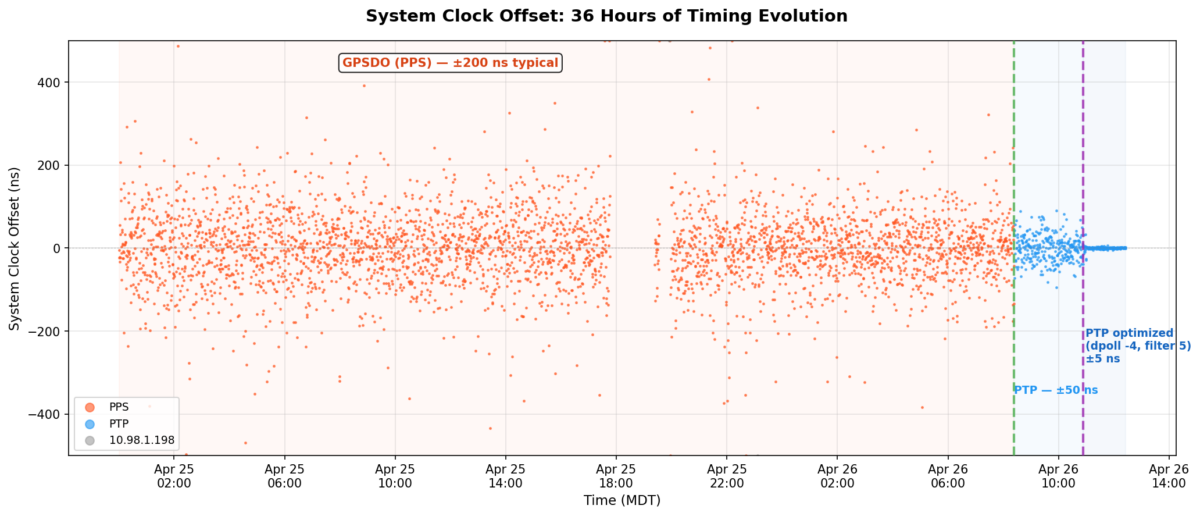
But first, here’s the big picture. This is 36 hours of chrony’s tracking offset – the actual error between the system clock and whatever reference chrony was using at the time:
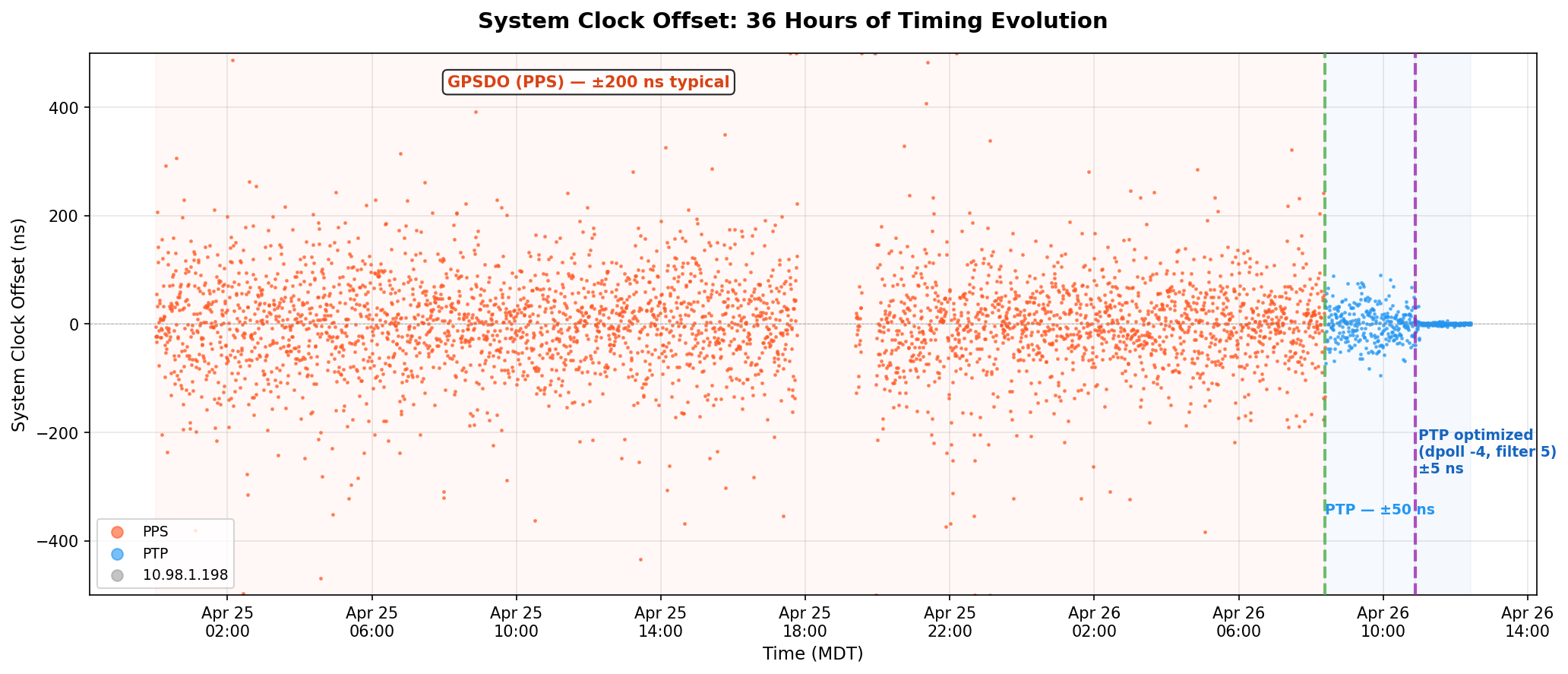
System clock offset over 36 hours - PPS scattered at ±200 ns, then PTP collapses it to a thin line
System clock offset over 36 hours – PPS scattered at ±200 ns, then PTP collapses it to a thin line

The orange scatter is the GPSDO’s PPS running chrony for a day and a half – ±200 ns on a good minute, ±400 ns on a bad one. The green dashed line is the moment I removed trust and PTP took over. The purple line is when I cranked the polling rate to 16 Hz. After that, the data is a flat line at zero on this scale.

ptp4l (OSA-5401 → Pi hardware clock):

MetricValue
RMS offset11.8 ns
Max offset17 ns
Path delay3,160 ns

chrony (Pi hardware clock → system clock):

MetricValue
Std Dev5 ns
RMS offset4 ns
Frequency skew0.002 ppm

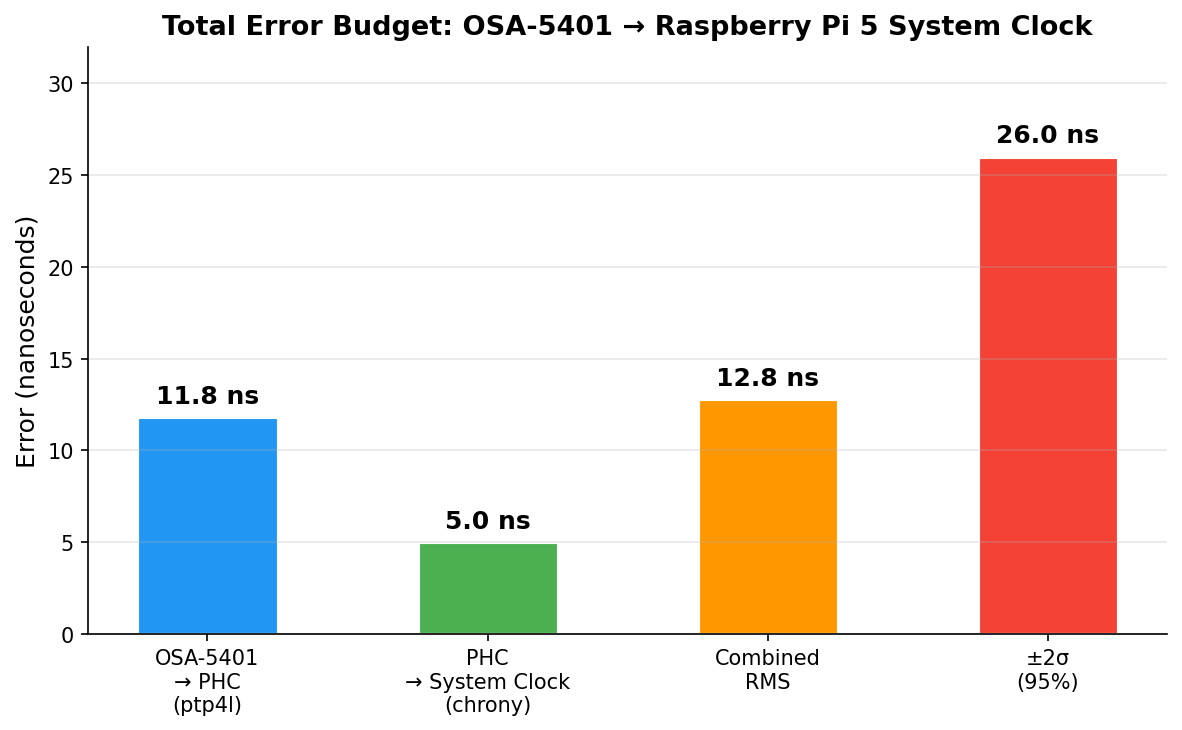
Combined error budget (root sum of squares):

LayerError
OSA-5401 → PHC (ptp4l)11.8 ns
PHC → system clock (chrony)5.0 ns
Combined RMS12.8 ns
±2σ (95% confidence)±26 ns

For comparison, my Pi 3B NTP server that’s been running for years:

MetricPi 3B (GPS PPS + NTP)Pi 5 (PTP + OSA-5401)
RMS offset182 ns4 ns
Std Dev312 ns5 ns
2σ bound~±600 ns±26 ns
Improvementbaseline~45x better
Error budget breakdown - ptp4l dominates at 11.8 ns, chrony adds 5 ns, combined 12.8 ns RMS
Error budget breakdown – ptp4l dominates at 11.8 ns, chrony adds 5 ns, combined 12.8 ns RMS

And here’s the distribution of 57,915 PTP offset samples after tuning. Mean of 2.9 ns, tight Gaussian centered right on zero:
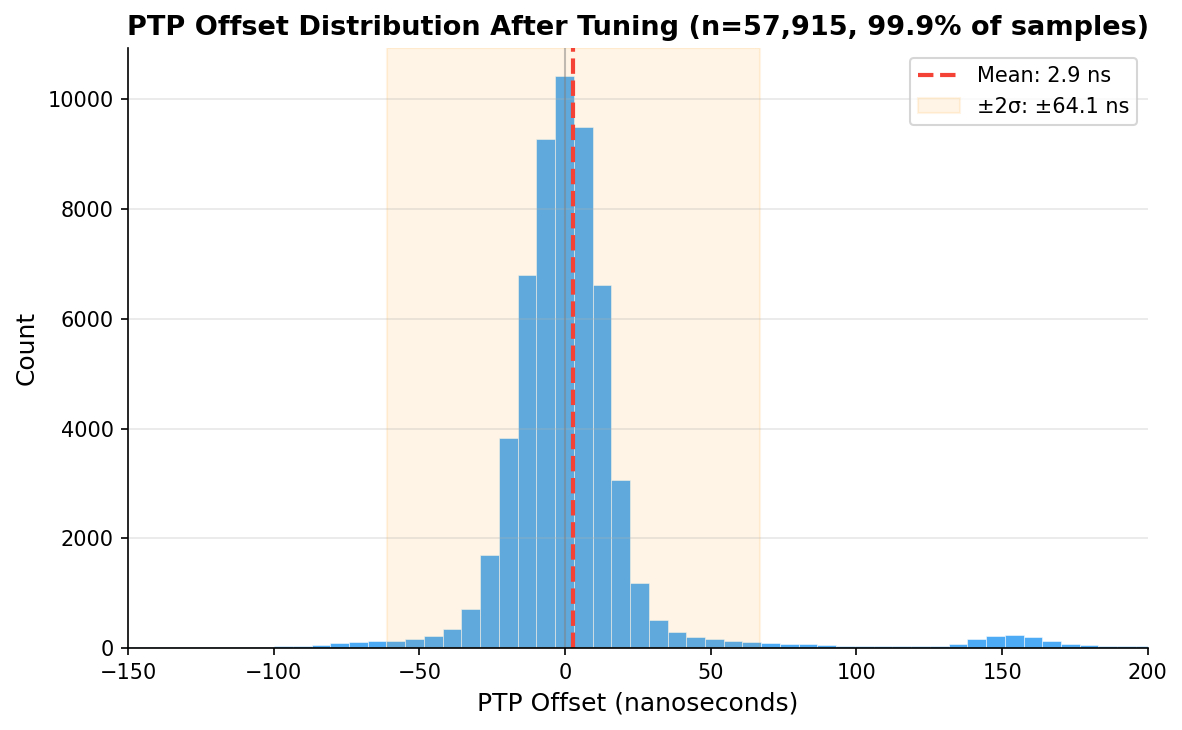
PTP offset histogram after tuning - 57,915 samples, mean 2.9 ns
PTP offset histogram after tuning – 57,915 samples, mean 2.9 ns

Checking Our Work: What Does the Raw Data Actually Say?

Those numbers above come from what the servos report. ptp4l prints a 1 Hz RMS summary. chrony’s sourcestats shows the standard deviation of its filtered, averaged output. Both are honest numbers, but they’re the numbers after each servo has done its best to smooth things out. What does the raw measurement data look like?

I pulled 110 minutes of overlapping data – ptp4l’s 1 Hz journal summaries and chrony’s 16 Hz raw refclock offset log – and computed 1-minute rolling statistics for each layer, then combined them as root sum of squares:
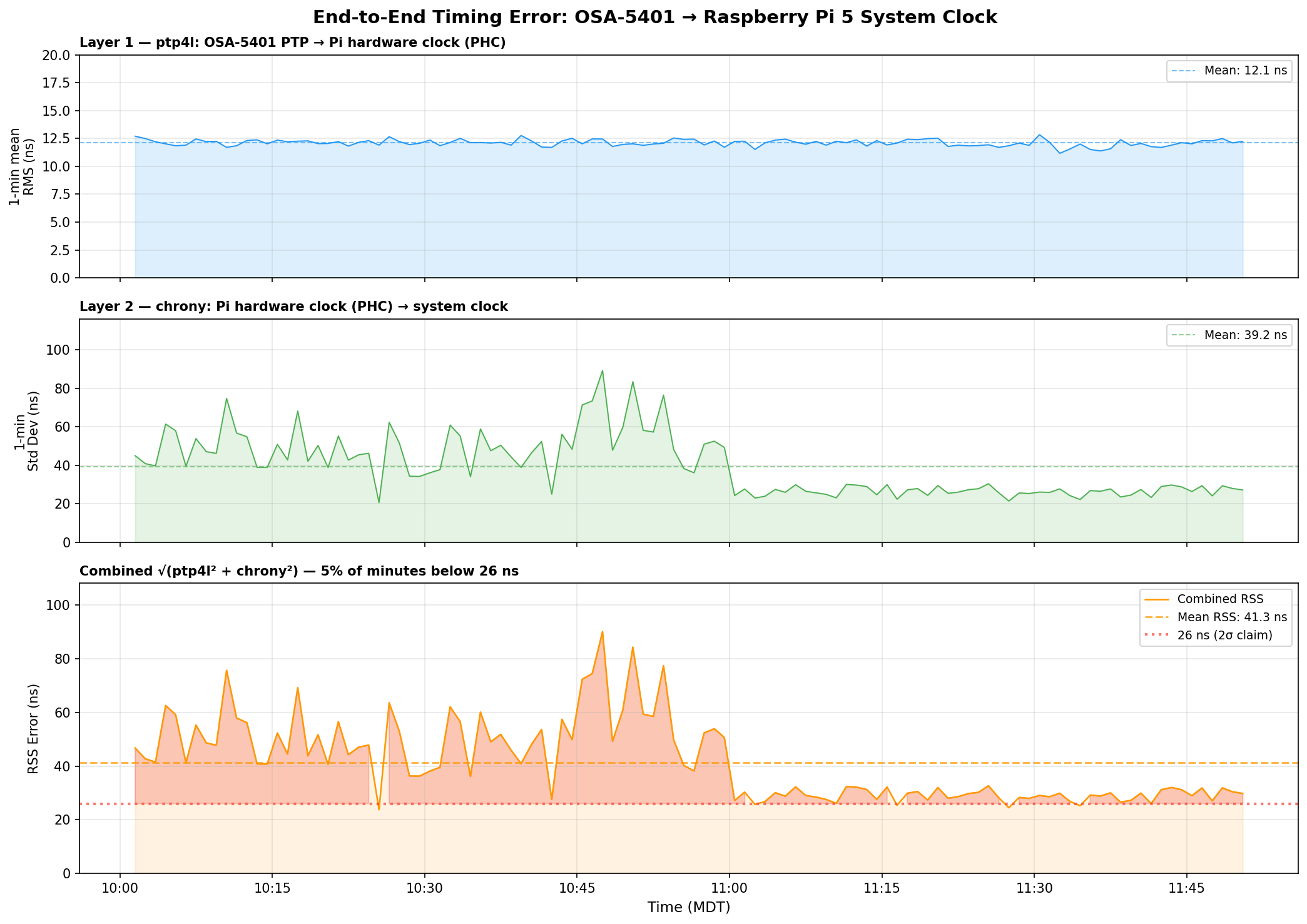
End-to-end timing error analysis - ptp4l at 12 ns, chrony raw jitter at 39 ns, combined RSS at 41 ns
End-to-end timing error analysis – ptp4l at 12 ns, chrony raw jitter at 39 ns, combined RSS at 41 ns

Three things jump out:

ptp4l is the stable one. Layer 1 (OSA-5401 → PHC) sits at 12.1 ns mean RMS and barely moves. The FPGA doing the hardware timestamping in the OSA-5401 earns its keep here – there’s just not much noise to begin with.

chrony’s raw readings are noisier than its filtered output suggests. The 16 Hz PHC reads have a 39 ns mean standard deviation per minute, with spikes up to 90 ns. But chrony’s sourcestats reports 5 ns – because the median-of-5 filter and the PI servo smooth that out before it touches the system clock. Both numbers are real; they measure different things.

The honest combined number is ±40–50 ns typical, not ±26 ns. The ±26 ns figure from chrony’s tracking output reflects the post-filter error – what the system clock actually experiences after chrony has done its smoothing. The raw measurement chain has more jitter than that. You can see the combined RSS settling toward 27–30 ns in the last hour as the servo tightened, but 40 ns is a fairer typical value.

Even at ±50 ns, that’s still 4× better than the Pi 3B’s ±200 ns. And the trend in the last hour suggests it keeps improving as chrony accumulates more data and tightens its frequency estimate.

GPSDO Flywheel Testing

With the PTP source providing a known-good reference, I can now characterize the GPSDO’s holdover performance. I unplugged the GPSDO’s GPS antenna and let it flywheel on its OCXO. Early results after the first hour showed drift still buried in the noise floor – under 100 ns/hr. The OX256B OCXO in this $70 unit might actually be decent. I’m collecting data for a longer run and will update this post (or write a follow-up) with the full holdover curve.

The dream setup is adding a DS18B20 temperature sensor directly to the OCXO case so I can correlate thermal drift with the oscillator’s frequency offset. That would let me separate temperature-driven drift from aging – but that’s a project for another weekend.

The Journey: Five Years, Six Orders of Magnitude

YearPostMethodAccuracy
2021USB GPS NTPNTP over USB serial~1 ms
2021GPS PPS NTPGPIO PPS + chrony~1 μs
2025Revisiting in 2025Tuned chrony + Pi 3B~200 ns
2025Thermal managementCPU temp stabilization~86→16 ns RMS
2026This postPTP + OSA-5401±26 ns

From a $12 USB GPS dongle to a $29 telecom SFP module. From milliseconds to nanoseconds. The total cost of the timing hardware in my current setup is about $100, and it’s achieving accuracy that used to require five-figure test equipment.

The next step down would be sub-nanosecond, and that requires White Rabbit – dedicated hardware, specialized SFP transceivers, and budgets measured in tens of thousands. For commodity Ethernet and general-purpose Linux, ±26 nanoseconds is pretty much the floor.

I think I’m done. (For now.) At least, that’s what I told my wife.

Configs for Reference

PTP refclock (/etc/chrony/conf.d/ptp-osa.conf)

# OSA-5401 via ptp4l -> PHC0
# ptp4l disciplines /dev/ptp0 to PTP timescale (TAI)
# tai lets chrony apply the current TAI-UTC offset from its leap second table
refclock PHC /dev/ptp0 refid PTP dpoll -4 poll 0 filter 5 precision 1e-9 tai

PPS refclock (/etc/chrony/conf.d/pps-gpsdo.conf)

# GPSDO 1 Hz PPS on GPIO 18
# dpoll 0 = read every pulse (1 Hz)
# filter 3 = median of 3 samples (odd count for true median)
# poll 2 = 4s loop update (2^2=4 >= filter 3)
# offset = MCU PPS delay compensation (58.3us measured against PTP)
refclock PPS /dev/pps0 refid PPS dpoll 0 poll 2 filter 3 precision 1e-7 offset 0.0000583

# Accurate LAN NTP server - coarse time for PPS second identification
server 10.98.1.198 iburst minpoll 4 maxpoll 6

ptp4l service

/usr/sbin/ptp4l -f /etc/linuxptp/ptp4l-osa.conf -i eth0

chrony main config highlights

log tracking measurements statistics refclocks
maxupdateskew 0.1
rtcsync
makestep 1 -1
leapsectz right/UTC
hwtimestamp *

The hwtimestamp * line enables hardware timestamping on all interfaces, and leapsectz right/UTC is required for the tai refclock option to work correctly.

Categories
DIY Offgrid Solar

DIY solar with battery backup – up and running!

Update

As of 5/13/2021, I have everything up and running! My DIY solar system with battery backup has produced 5.9 kWh over the last few days. It has been very wet and rainy this spring here in the Front Range of the Rockies and I don’t think we’ve had a full day of sunshine in a couple weeks. In terms of dollars, that 5.9 kWh is worth $0.649. Not much, but knowing I can power the whole house for 6 hours (based on average consumption) is a pretty good feeling. Check out my last post for some detail on how I got the battery bank set up – DIY Solar System with battery backup update.

Battery bank

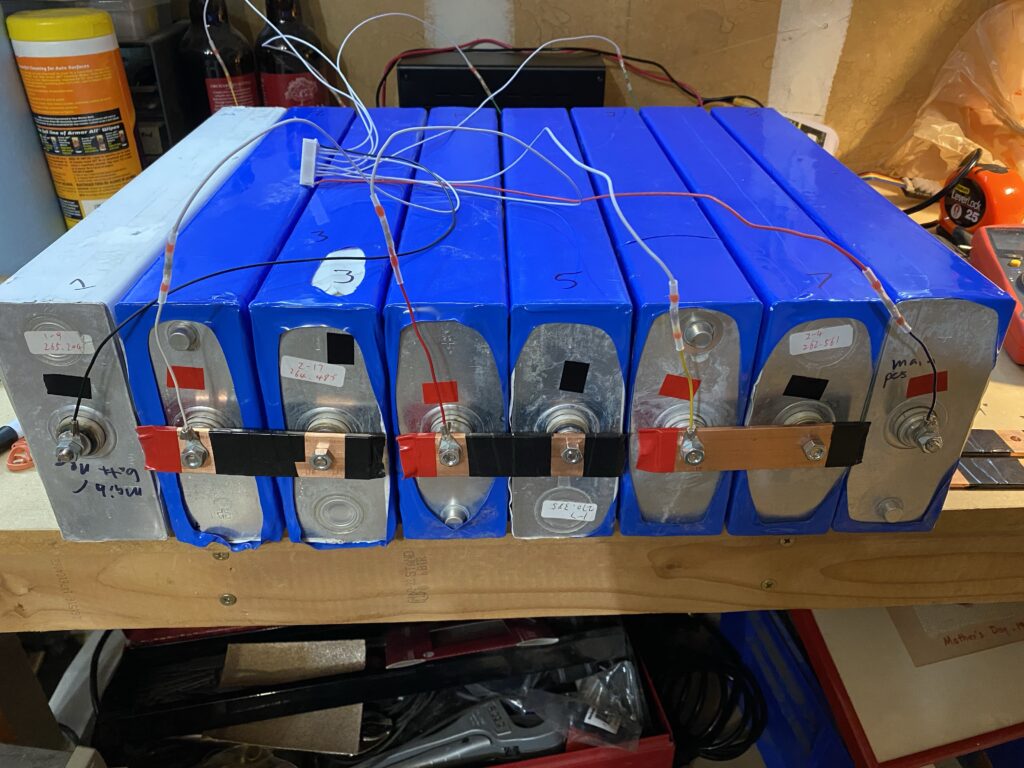
The battery bank has performed great so far. I am in the process of doing a full discharge test. These cells did each come with a discharge test sheet from Battery Hookup, all showing more than 260Ah (most around 262Ah). Total for the batteries was $1082.

8x260Ah LiFePO4 cell battery bank ready for BMS

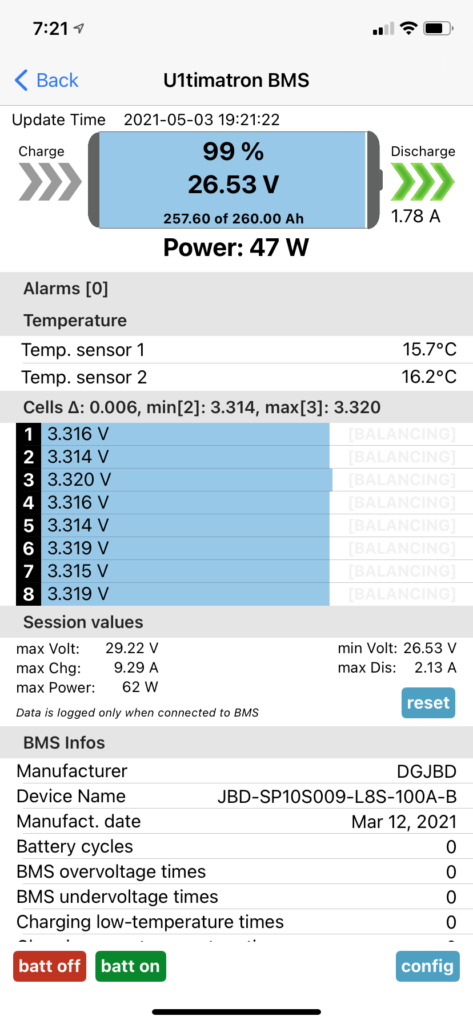
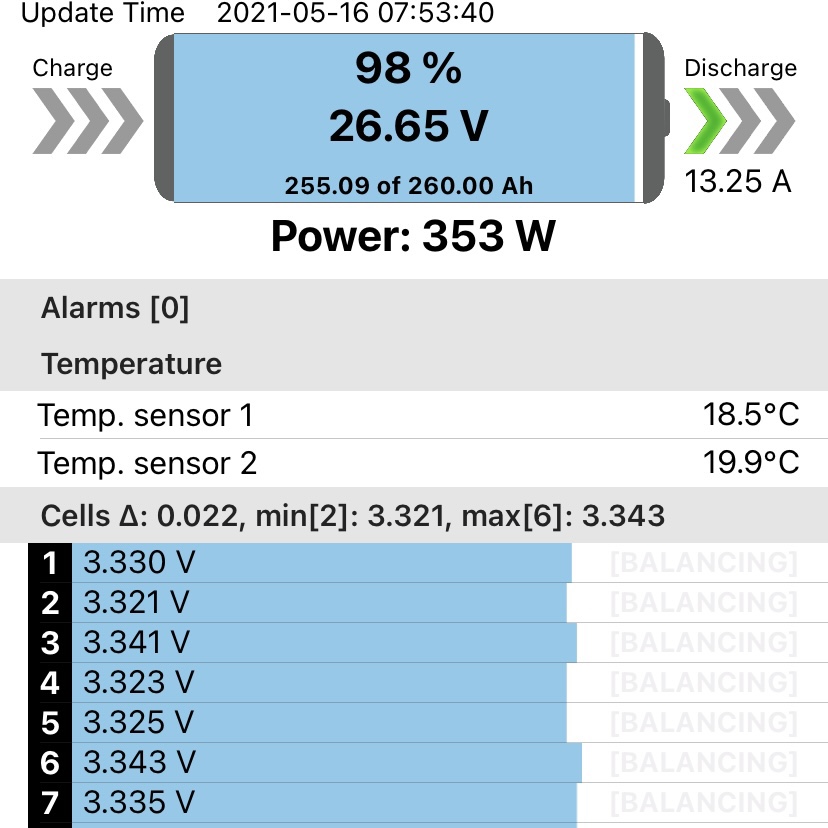
Under discharge in the flat part of the curve, the cells are extremely close in voltage. Below is a screenshot of my BMS app (XiaoxiangBMS, which is a super handy app. the fastest I’ve ever spent $6 on the pro version of an app) showing minor discharge current and the cells are within 6 millivolts of each other. It really doesn’t get much better than that.

BMS app (I am not creative enough to name my BMS the U1timatron) showing closely matched cell voltages during discharge

BMS

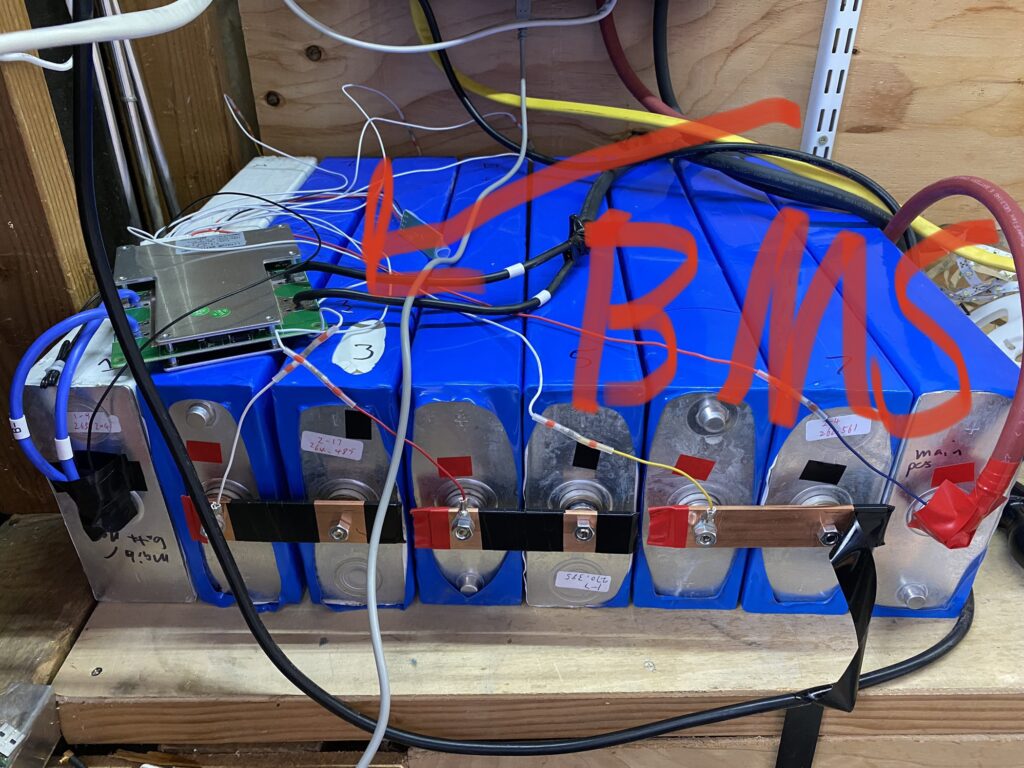
The BMS is a JBD 8s 100A model I got from eBay that comes with bluetooth monitoring ability. It has worked flawlessly so far. I love it when technology just works. Every setting can be configured. It keeps track of every alarm event. It has temperature protection. Great BMS.

JBD 8S 100A Battery monitoring system (BMS) keeping tabs on my LiFePO4 cells
BMS showing a modest discharge. I’ve taken it to 1200W so far.

Inverter

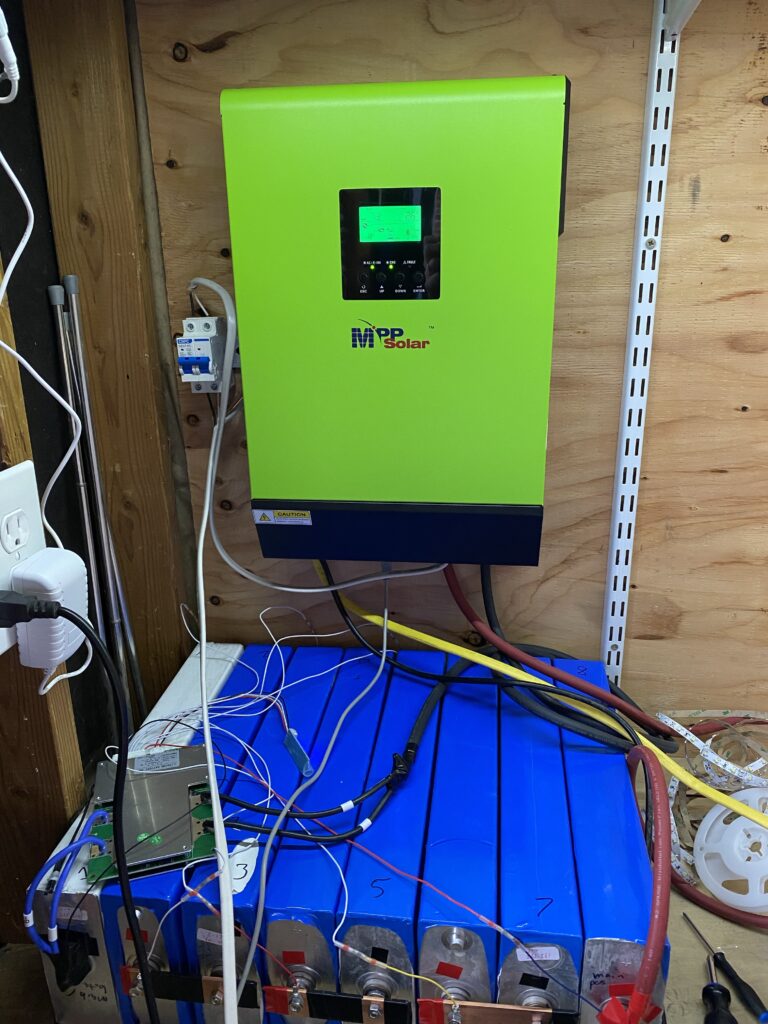
The all-in-one inverter (inverter, battery charger, MPPT solar controller) is a MPP Solar LV2424 hybrid model. Everything works as expected. I’ve tested all the features successfully. I even got the monitoring software going. The main downside so far to this inverter (and I think this is common) is a relatively high idle power consumption. The BMS reports ~56-60W draw with the inverter on and nothing plugged in. The “idle” power draw decreases as a proportion of the total load on the inverter but it never drops to 0. For example, at 0 load, the inverter draws 60W. At 120W load (based on a questionable Kill-A-Watt), the inverter is drawing 160W, meaning the “idle” power dropped to 40W. This inverter was $665.

Inverter mounted above the battery bank. The solar breaker is to the left.

Solar panels

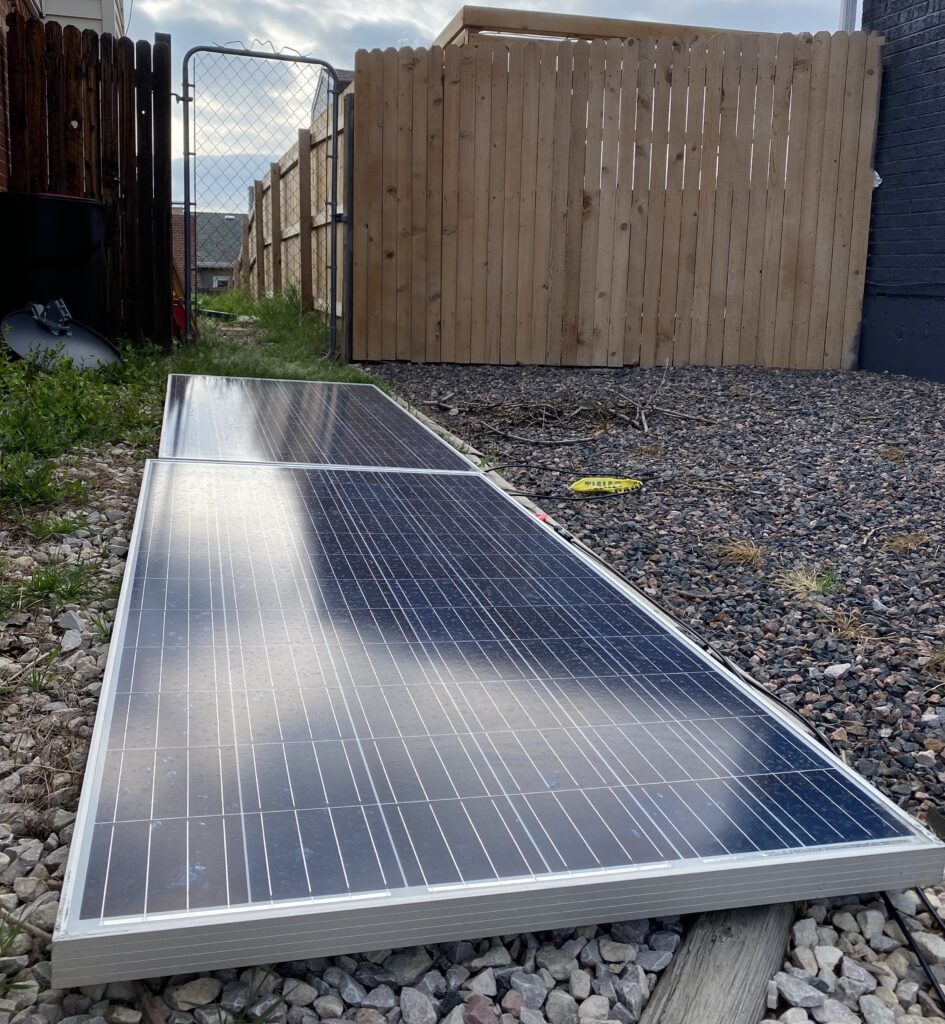
My $100 each solar panels from Craigslist have been hooked up on and off over the last few days. I haven’t seen more than 480W from the 2 of them combined but they are laying completely flat (they should be tilted towards the sun for maximum power). Overall, happy for the price. I need to get them mounted on the roof.

The main testing location on the south side of our house. They’re basically flat, maybe tilted a degree or two to the south. I haven’t seen more than 480W from them (rated for 2×310=620W) yet but they were cheap so I’m not too disappointed.
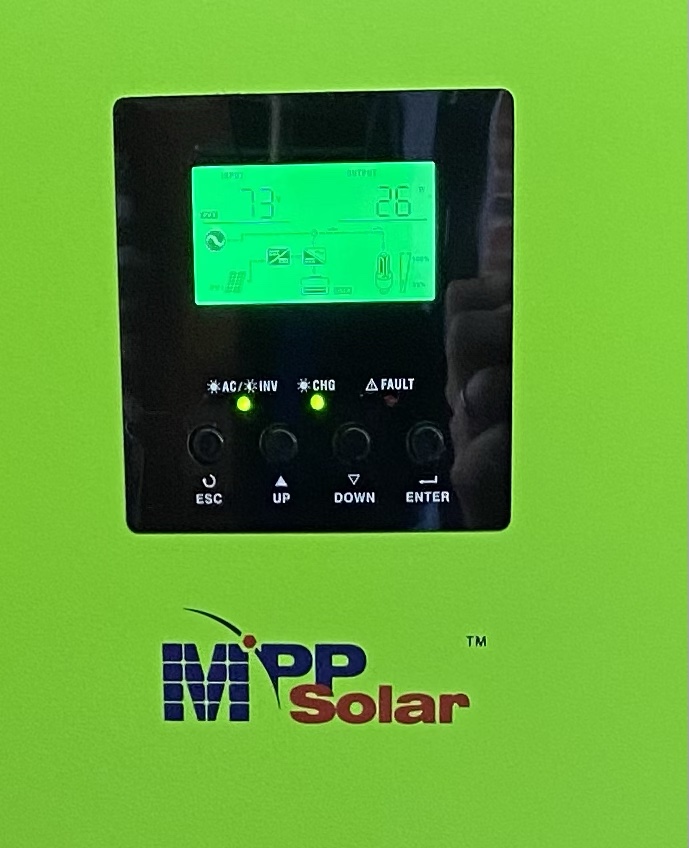
Inverter showing the panels putting out 26W on a very cloudy day recently. It has apparently decided that 73V was optimal for whatever conditions were present.

What’s next

My DIY solar system with battery backup is commissioned! Things are functional. Things aren’t located optimally. I need to get the solar panels mounted on the roof and do some tidying around the batteries/inverter. I plan on mounting some drywall above the battery cells to protect from whatever and covering up all the battery terminals. The rear of the cells are covered. The mains are covered. Some of the intermediate terminals are not.

I’m already looking on Craigslist for more solar panels, but I need to 100% finish this project before adding on to it according to my lovely wife (I am sure some of you know exactly what I’m talking about!). With that, I’ll be signing off for the night. The baby is having a very hard time falling asleep tonight. Until next time!

Categories
DIY Offgrid Solar

DIY Solar System with battery backup update

Update

As of 5/1/2021, all of the main components of my DIY solar system with battery backup have arrived. I posted about the requirements, component select, and some fun with shipping from China in my initial solar post – Planning my 600W DIY solar system with 6 kWh battery backup. If you want some background of how we got here, head to that link then come on back.

Background

To recap, my DIY solar system with battery backup consists of a few main components:

  • 8x 260 amp hour prismatic LiFePO4 battery cells. They will be placed in series for a 24V nominal system with around 6.0 kilowatt hours of usable storage.
  • MPP LV2424 hybrid all-in-one inverter. This device handles converting direct current (DC, like a car battery) to alternating current (AC, like household outlets) and charging the batteries
  • 2x 310W Canadian solar panels. These will be wired in series for 72V maximum power point voltage.
  • 8S JBD 100A battery management system – to protect the batteries from a number of undesirable conditions

The other miscellaneous things that I need are: battery bus bars, wiring, ring terminals, and general connection things.

Materials arriving and resting battery voltages

We were on vacation when the batteries (and inverter) arrived so they sat for a few days before I got a chance to unbox them. The batteries were very well packaged and I can’t thank Battery Hookup enough for how fast they shipped after what I’ve been dealing with from China.

battery cells unpacked

Upon unboxing, I made sure to record the resting voltage of each cell. Below were the resting voltages:

cellvoltage
13.341
23.345
33.435
43.339
53.351
63.376
73.343
83.363
min3.339
max3.435
avg3.362
delta0.096
Resting voltages of the 260 amp hour BYD LiFePO4 cells

Cell #2 had the lowest voltage and cell #3 the highest. This presented an easy chance to test out my bus bars for voltage equalization. I did not measure the cell internal resistance so I wasn’t really sure how much current would flow from cell 3 to 2 when shorted together so I did a quick estimate based on Ohm’s law (V=IR -> I=V/R). With an estimated internal resistance (IR) of 20 milliohms (I’ve had LiPo in this range after some degradation), and a voltage difference of 0.096V, that would mean a current of 0.096/0.020=4.8A. That wasn’t a huge number so I was comforable just connecting the cells with the bus bars. But first I wanted to actually measure with a multimeter.

I was expecting about 5A based on the calculation above. I’m not sure how I was 10x off on the estimate but after hooking up my multimeter, the equalization current was 0.6A. That was plenty low so I set my mind to balancing. But before that, I needed bus bars to connect all the cells in parallel.

Constructing copper bus bars

Bus bars are used to conduct high amounts of current in electrical applications. In essence, they are oversized, flat wires. I ordered 2x copper bars from McMaster Carr that are 1″x1/8″x3′. They arrived in two days with free shipping… Amazon is gaining competition. I got to work drilling holes.

bus bars ready for drilling
copper bus bars ready for drilling with marks spaced 2.5″ apart
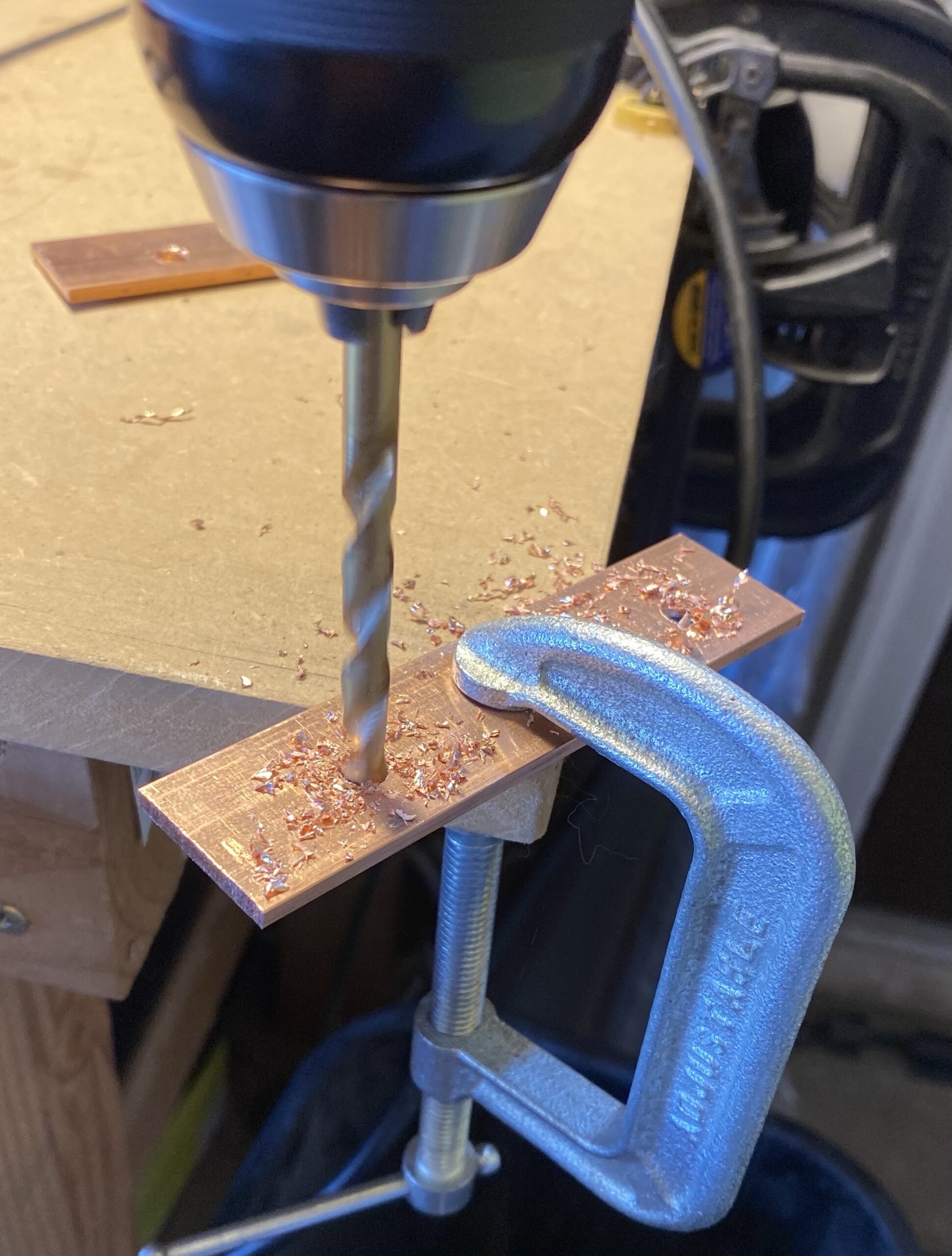
drilling 2mm pilot hole
drilling 6mm hole
drilling 6mm final hole
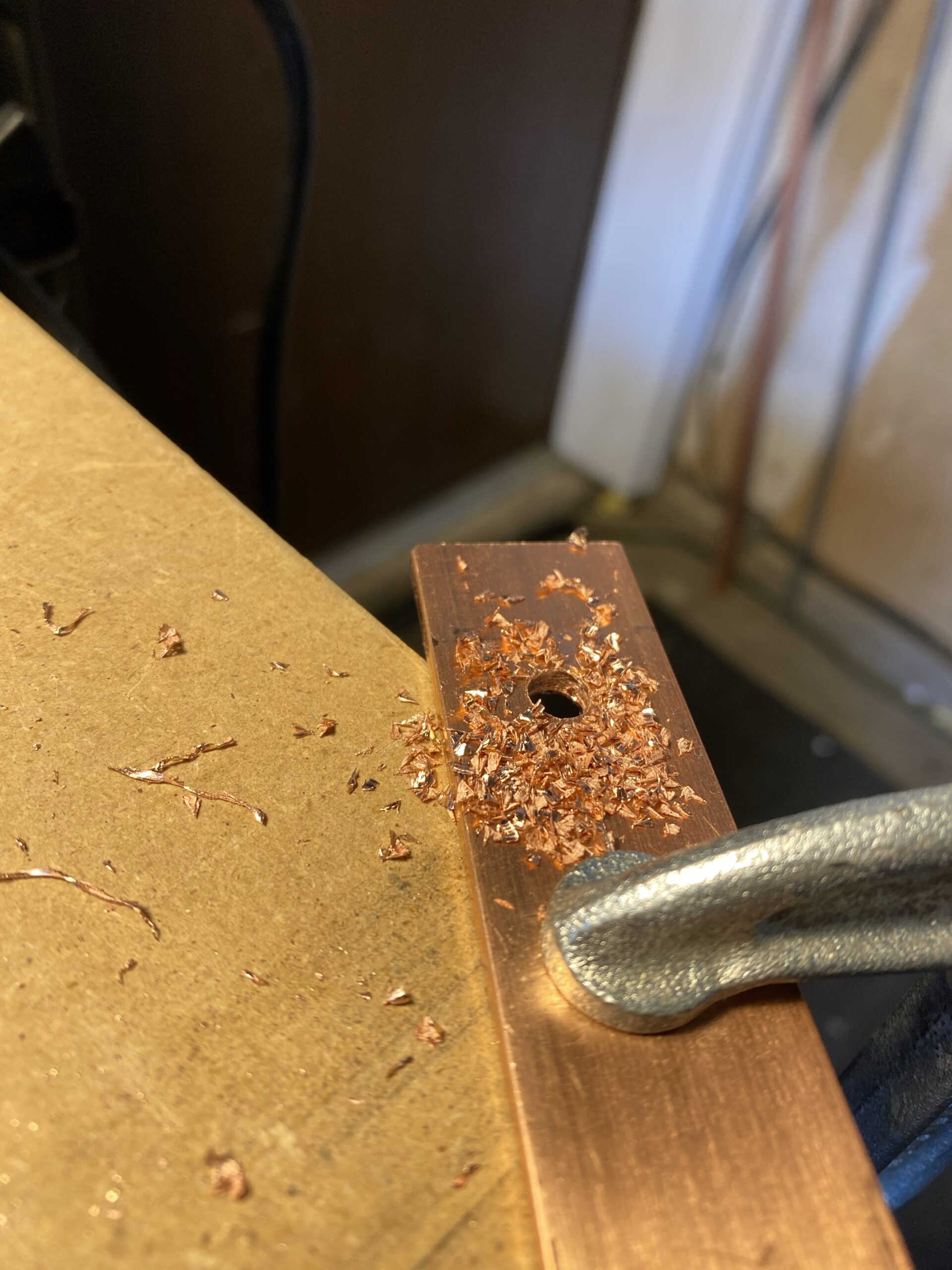
copper shards after drilling
filing down rough edges

Heat shrinking the cells

With the bus bars ready, it was time to heat shrink the battery cells. Battery Hookup said they were uncovered and needed to be heat shrunk for every cell. Turns out 7 of 8 had a covering on them already. I heat shrunk them anyways for two reasons: 1) to further protect the cells from damage and short circuits and 2) so they look better. The cell on the left will be re-done with more heat shrink. I guestimated how much I needed and was short a few inches.

cells ready for heat shrink
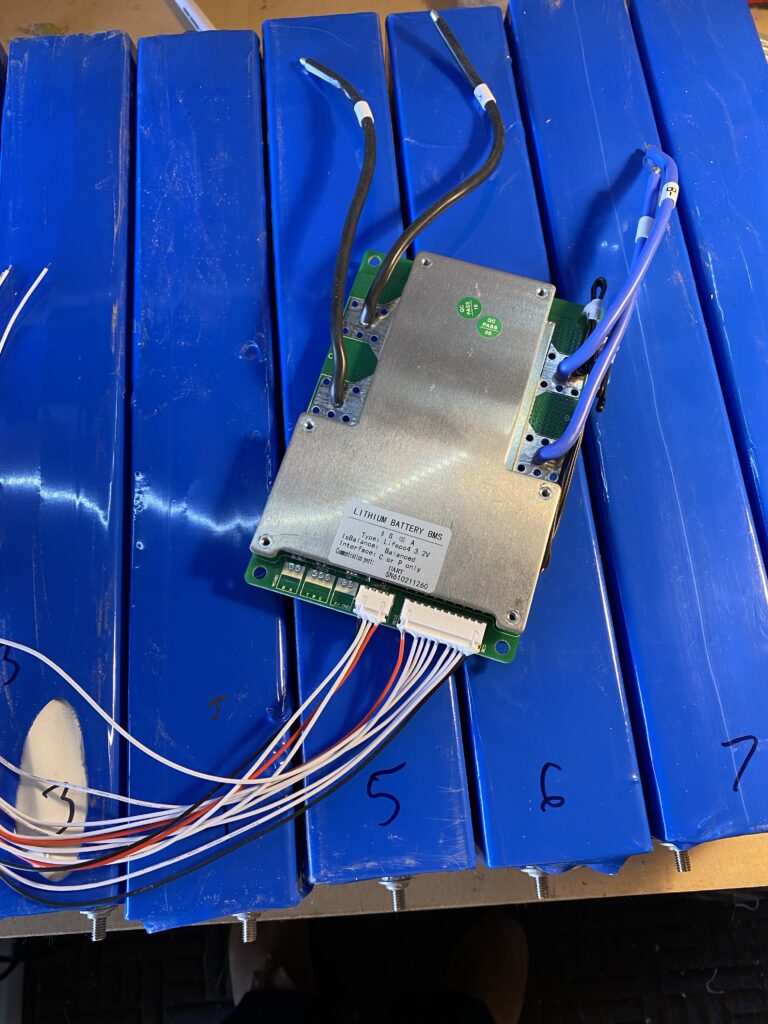
cells heat shrunk with BMS
cells heat shrunk with BMS on top

Balancing in 2 sets of 4 cells each

When making the bus bars, I put together a mental picture of what I needed to make and how many I needed. This worked fine for the final battery but I would need double for balancing. I had the full extra 3′ copper bar but it took forever to cut so I just decided to balance the cells in 2 groups of 4. Balancing is charging all cells in parallel as one low voltage, giant capacity battery to their rated voltage (3.65V for LiFePO4). Doing 4 cells at a time meant it was a 3.2V battery with a capacity of 1040 amp hours. The resting voltages were in the upper end of the voltage curve chart so it wouldn’t take super long. If the battery was fully depleted, it would take 104 hours at the 10 amps my bench power supply puts out.

So I got the bus bars hooked up and started balancing by setting my power supply to 3.65V and current to max.

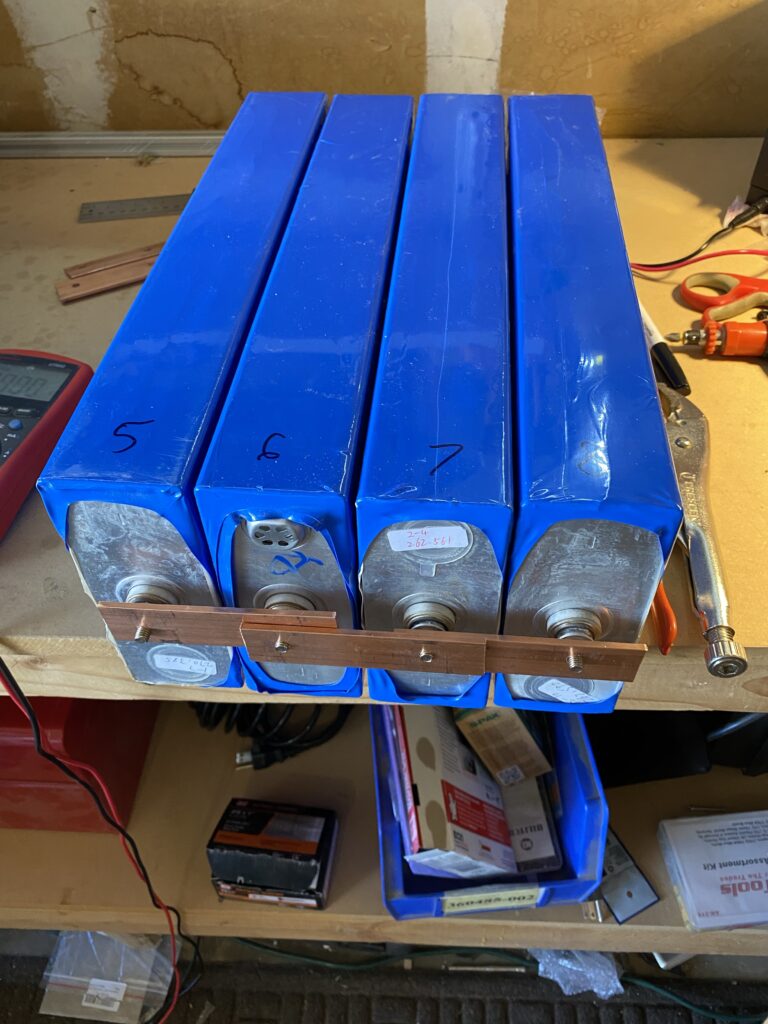
battery cells hooked up in parallel
battery cells hooked up in parallel (4x cells in parallel means a single 3.2V 1000Ah “cell”)
Measurement discrepancies and voltage drop

The first thing I did when I started charging was take voltage measurements to make sure things were right. I noticed some irregularities.

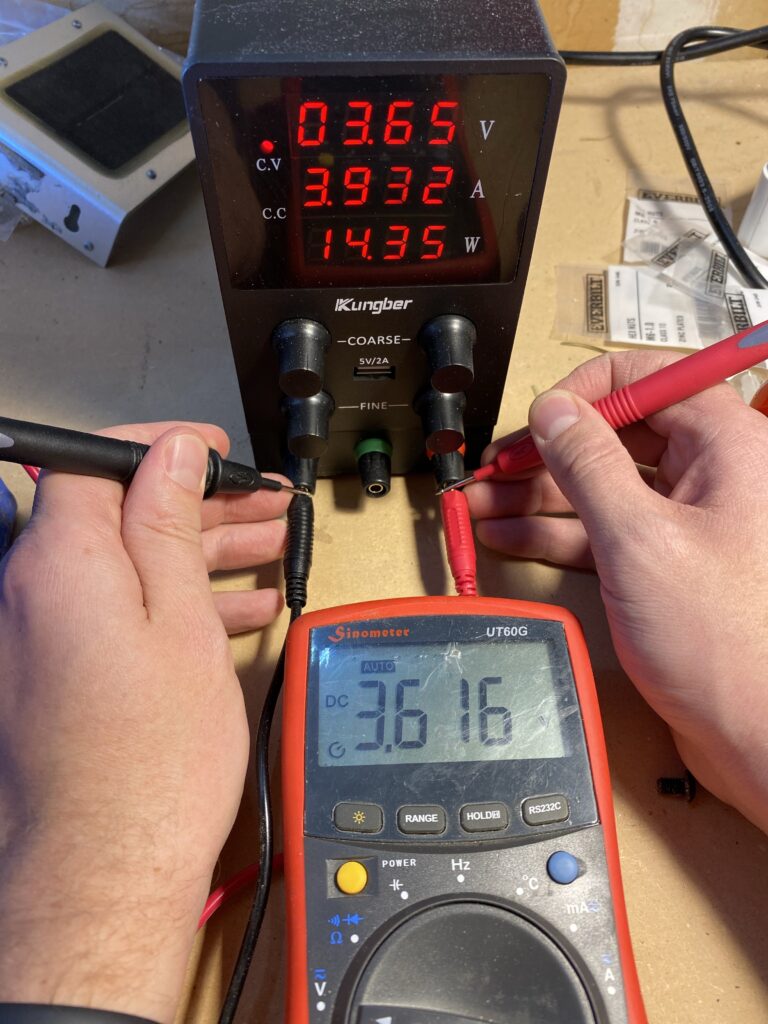
The first irregularity was the fact that the bench power supply was over-reporting the voltage by 0.034V or so when comparing the display to the terminals. This isn’t a huge deal and is actually a pretty decent level of accuracy for a $40 bench power supply from Amazon.

verifying DC power supply output voltage
verifying DC power supply output voltage (set to 3.650V, actual output is 3.614V)

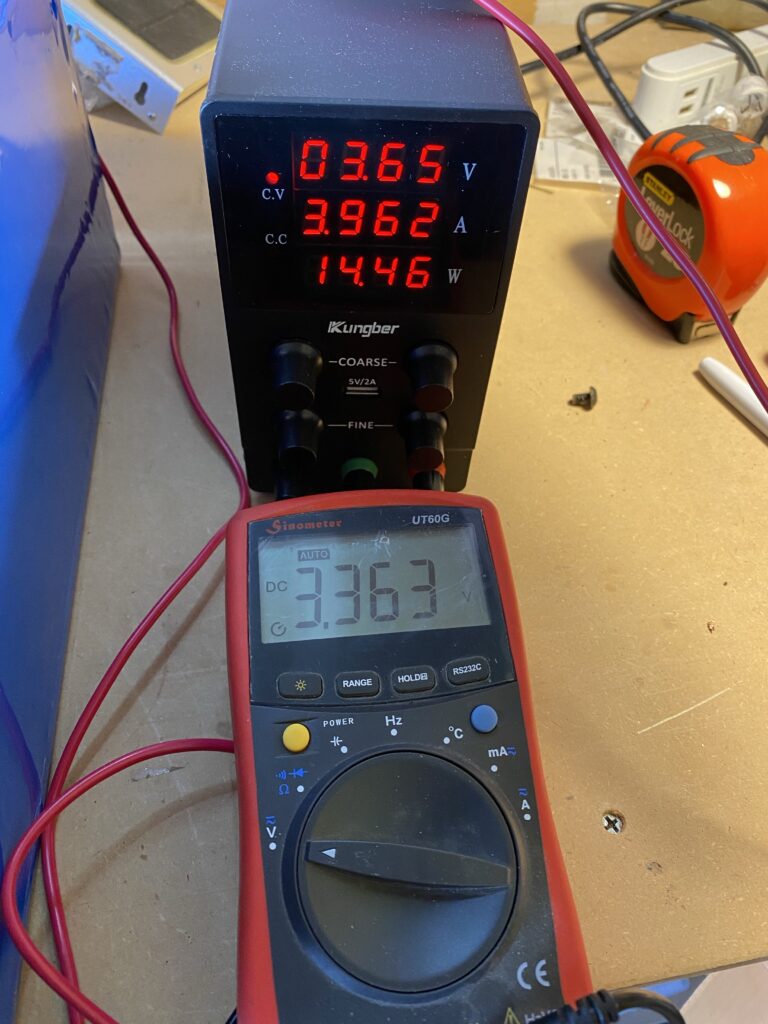
The next thing I noticed is that for a 10A power supply, it is putting out a lot less than 10A. So I measured the voltage at the bus bars.

measuring voltage at bus bars
measuring voltage at bus bars. this is a pretty big voltage drop through the charger wires. 3.616V at the terminals – 3.363V at the bus bars is 0.253V drop. At 3.962A, that is a resistance of (V=IR -> V/I=R) 0.063 ohms. the wires were warm.

By leaving the voltage set to 3.65V at the DC power supply, the voltage drop means I wouldn’t get anywhere the rated 10A. The actual drop would decrease proportionally as the battery voltage neared the terminal voltage.

Regardless, it only took a couple hours until the cells were topped off for each set of 4. They are currently resting. I will check their voltages again tomorrow morning. The amount the cells drop in voltage from where they left off indicates the strength of the cell, with larger drops meaning weaker cells.

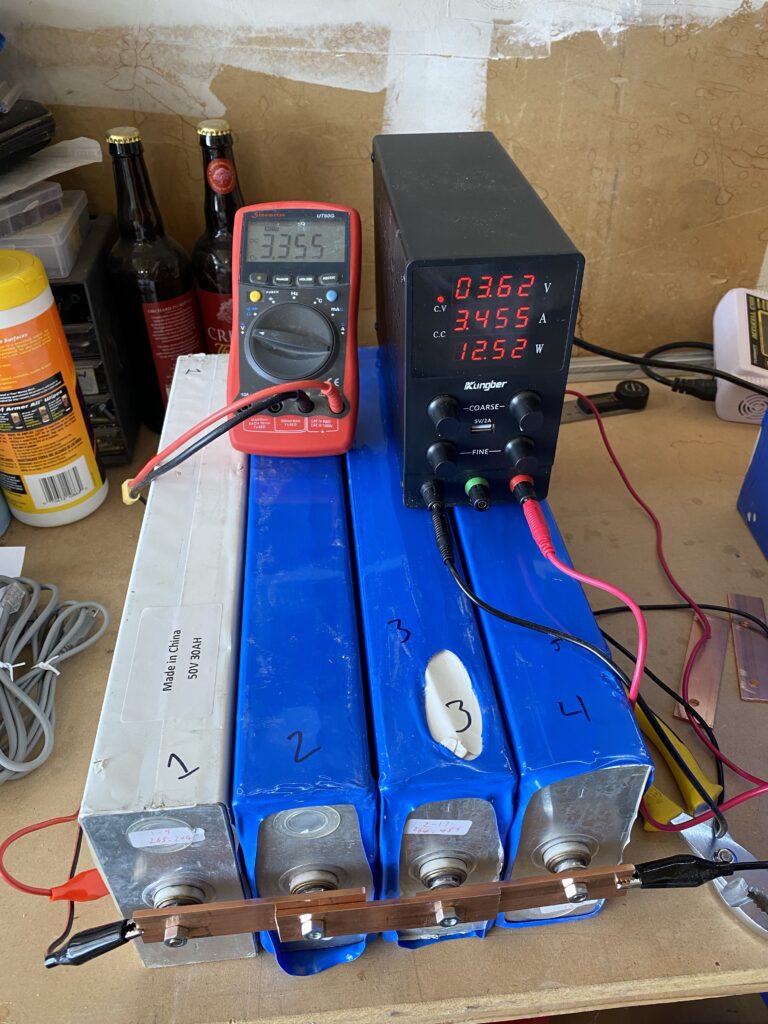
balancing in progress
the very start of balancing the 2nd set of 4 cells. I do intend to rewrap cell 3 and wrap cell 1 when my next batch of shrinkwrap arrives.

Conclusion

This is where we will leave off for the day. The 8 cells have been balanced in 2 groups of 4 and are currently resting. After 24 hours I will recheck the voltages to see which cells are strong and which are weak. I need to buy more electrical tape to cover up the bus bar ends (I did start assembling the full battery but stopped because the potential for short-circuit was higher than I was comfortable with).

As of 5/17/2021, things are up and running! Check it out at DIY solar with battery backup – up and running!

Categories
DIY Offgrid Solar

Planning my 600W DIY solar system with 6 kWh battery backup

This post is a work in progress! Update log here:
  • 2021-03-15 – initial post (private)
  • 2021-04-06 – fleshing out the background and requirements
  • 2021-04-29 – updated with parts ordered, reasoning for choices, and some more background for my DIY solar system with battery backup

Background

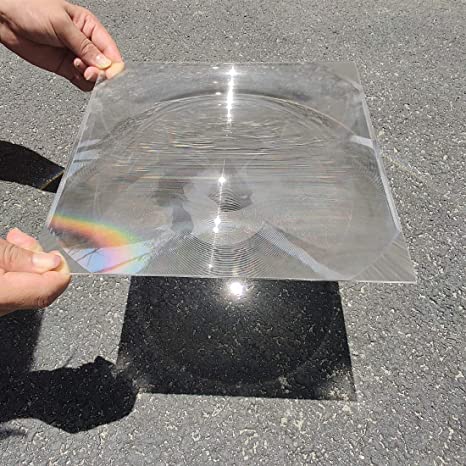
I’ve always been interested in solar power. Being able to generate heat and electricity from the sun is just so cool on a fundamental level. When I was little, playing with magnifying glasses (read: setting things like plastics and mulch on fire) was always a good time. My mom got me a science book at one point that had a full letter sized (8.5×11″) fresnel lens.

large fresnel lens focused on pavement
The fresnel lens of my childhood wasn’t quite this big but but it sure seemed like it to my 10 year old brain

That fresnel lens upped my lighting things on fire game dramatically. Even since then I’ve wanted to harness large amounts of solar power. I’ve had 50-100W solar panels for a good portion of my adult life running fans and charging small deep cycle 12v batteries, and it is now time to move up to the big leagues. Read on to join my thought process for planning a large-ish system.

Requirements

The requirements for my DIY solar system with battery backup aren’t too strict. I’m looking for the following:

  • Run my homelab for 5-10 minute until it can be powered off
  • Provide a couple hours (1-2) of space heating/cooling for comfort with plenty of battery left over
  • Run the refrigerators for 6-12 hours
  • Run the cable modem/router/WiFi for ~6-12 hours
  • Run the furnace as needed
  • Ability for a generator (to be purchased) to charge the batteries
  • Ability for grid power to charge the batteries
  • Ability for solar panels to charge the batteries
  • Less than $2000 total to get started with a system that can grow
  • Use my 2x300W solar panels I picked up off Craigslist for $100 each
Nice to haves
  • USB/RS-232/RS-485/Ethernet Interface to read status via Raspberry Pi or similar
  • Decent warranty (I don’t usually worry about warranties but this will be a decent chunk of change)
  • Not waiting another two months to ship from China (I may have already ordered the batteries. Ordered Feb 26 2021. Still waiting for even a tracking number as of April 29.)

Initial plan

If we add up all the electricity requirements, we end up with a couple to a few kWh (I am being intentionally vague here. I’ll post details with my next update.). This DIY solar system with battery backup is intended to grow with me – I’m not building a data center-sized system to start. As such, I have a tentative list of the basics:

  • 2x300W solar panels. They are Canadian Solar CSUN-something 36V nominal. Already have these.
  • 8x272Ah LiFePO4 batteries in series for 24V nominal. These will total out to 6.9 kWh of storage assuming full capacity. For $101 per cell shipped, this deal is hard to beat even if it is taking the slow boat from China. 6.9 kWh divided by $101 per cell is $116/kWh.
  • A 2.5ish kW inverter. Current choices are MPP Solar LV2424 (2.4 kW 24V with most of my requirements for ~$700) or the Growatt SPF 3000TL LVM (3.0 kW 24V with basically the same features as the MPP for ~$700. but there will be at least a month shipping delay).
  • A quality 8S BMS (expect to spend around $150 for this)

Solar panels

I get an urge to troll craigslist for solar panels (and NAS’s) every couple weeks and came across a post that had 300W solar panels in Loveland, CO. They were in great shape and they were $100 each. $0.33/W is a pretty good price for solar panels so I jumped on them. I didn’t really have a use but knew I would in the future. There is a slight “prepper” tendency I always have in the back of my mind so part of me was thinking I’d be able to use them to charge stuff in the event of an extended power outage. Since I bought them, we have had 3 power outage – one for 2 hours, one for 1 hour, and another for 15 minutes.

[insert pic of solar panels]

Batteries

For batteries, there are a lot of good options. Some better than others. There are a few big decisions:

  • Battery chemistry
    • Lead acid – the traditional “car battery” type but deep cycle. Old tech, heavy, usable capacity is relatively little compared to the full rated capacity (generally recommended to not discharge deeper than 50%). Pretty good price in terms of watt-hours per dollar. Almost all inverters/chargers are designed around 12V/24V/48V as defined by the lead acid cell voltages.
    • Lithium-ion – new tech. Used in many electric car batteries – primarily Tesla. Lots of used cells available (often in bulk). Each cell is about 10Wh. This means many wire connections (500-1000) and soldering. Does not handle overcharging/discharging well. Can cause fires/explosions if handled improperly. No good solutions for 12V standard stuff. 7S (7 cells in series) can work for 24V. 13S works for 48V
    • Lithium polymer – very power dense. Not very energy density. Quite hazardous. That by itself is enough to write these off.
    • Lithium iron phosphate (LiFePO4) – new tech, decent tradeoff for all other aspects mentioned above. Used in electric buses in China (which is a source for cells). Very large capacity per cell (>200Ah), which means minimal wiring. Cell voltage is 3.2V, which matches up perfectly with traditional lead acid voltages (4S is 12V, 8S is 24V, 16S is 48V). Good cycle count/capacity curve (it takes many cycles to reduce capacity). I will be using LiFePO4 batteries in my system.
  • Battery bank voltage – requirements are for a 2.5kW inverter.
    • 12V – 200+ amps for a 2.5kW inverter. This would need large wires. Generally the amount of current at 12V throughout the system would be high. Ability to “start small” with only 4 LiFePO4 cells.
    • 24V – 100 amps for 2.5kW inverter. Much more reasonable. I will be using 24V for my system.
    • 48V – 50 amps for 2.5kW inverter. Even more reasonable but this requires greater up front investment to get enough batteries (16 cells for LiFePO4, meaning $2000+). Borders on what is considered “high voltage” for low voltage DC work (generally the cutoff is 50V).

Below is a table I created in Excel to help me make my decision. When I came across the group buy for the DIYSolar Michael Caro 272Ah cell group buy from China, I took 2 days to decide and ordered 8 cells. That was Feb 26, 2021. I still don’t even have a tracking number. I’ll probably cancel the order. Mid-April, 260Ah cells became available at batteryhookup.com. They weren’t the cheapest in terms of watt-hours per dollar, but they were in Pennsylvania and would arrive to me in a predictable amount of time. With my yearly bonus and tax refund firmly in my bank account, I figured I could have two orders opened at once. I placed the order with BatteryHookup. It took 6 days for 8 cells to arrive. I still don’t have a tracking number for the group buy from China. I can afford to wait. Or I could cancel the China order and get 8 more cells on my door step a few days from now… decisions, decisions.

namelg chem 4p modulesnissan volt 8 packbasen 280ah lifepo4varicore 280ahmichael diysolarbatteryhookup 260ah cells
linkbatteryhookupbatteryhookuplinklinklinklink
chemistryLi-IonLi-IonLiFePO4LiFePO4LiFePO4LiFePO4
nom voltage (V)3.67.63.23.23.23.2
rated cap (Ah)6064272280272260
cap remaining (%)70%70%100%95%100%100%
usable cap (Ah)4244.8272266272260
cell energy (wh)151.2340.48870.4851.2870.4832
cost ($/cell)2040116114.995101125
wh/$7.68.57.57.48.66.7
series738888
parallel221111
total cells1468888
nom bank V25.222.825.625.625.625.6
max bank V29.425.229.229.229.229.2
min bank V22.419.222.422.422.422.4
spares220000
total cells1688888
bank capacity211720436963681069636656
bank cost320320696919.968081000
shipping cost60542530088
total cost380374949919.968081088
bank $/kwh180183136135116163
prosmodular-ishmodular-ishnew, bignew, bignew, bigfast shipping, good capacity
consgood amount of hooking up, usedgood amount of hooking up, used, bad voltageslong shipping time (30-50 days)long shipping, grade Blong shippingexpensive

Inverter

For the inverter, it really came down to two options:

  • MPP Solar LV2424 – 24V 2.4kW 120V (able to be stacked for split phase and/or more current) – this is what I picked
  • Growatt SPF 3000TL LVM – 24V 3.0kW 120V (able to be stacked for split phase and/or more current)

I posted a poll on DIYSolar asking for the popular opinion. Most said go with the Growatt (5 votes to 2 as of 4/29/2021). Will Prowse (solar genius) said they’re basically the same. Both batteries allow charging by utility, have solar MPPT chargers, and monitoring via serial.

I ordered the battery and knew it wouldn’t take long to arrive. The option for Growatt involved waiting 3-4 weeks for a container to arrive at the Port of Long Beach from China. The MPP option shipped from Utah (I am in Colorado – one state to the east). I picked MPP mostly based on shipping time. Also because 8S 100A BMSs are pretty common (which works well for 2.4kW because 100A * 24V = 2.4kW) which usually have a trip limit of around 110A. The next step up is usually 200A which is a correspondingly large increase in cost.

Battery Management System (BMS)

The BMS is there to protect the battery. It protects from a number of conditions – overcharge, overdischarge, overcurrent, cold temperatures, short circuit, and others. The main criteria here is 100A nominal (with overcurrent kicking in around 110A), 8S for 24V, with some sort of monitoring capability (serial, bluetooth, WiFi, etc). An active balancer would be good but that appears to be in the next higher price range. I ended up going with the JBD 8S 100A BMS for $80. One of the things that really caught my eye was this thread about monitoring – it appears these are really capable of putting out data.

Conclusion

With all the main materials/parts ordered, it is time to focus on how to construct the system. When it is all hooked up and ready to go, I will have a small DIY solar system with battery backup to power a few select loads in the house. The main components are:

  • 8x 260Ah prismatic LiFePO4 cells for a 24V nominal system with 6.6 kWh of storage
  • MPP LV2424 inverter for 2.4kW of 120V power with ability to charge from grid, solar, or generator as well as expand with more units in parallel
  • 2x300W solar panels to charge in case of long term outage
  • JBD 8S 100A battery management system