Categories
Chrony DIY homelab Linux NTP PTP Raspberry Pi

From Milliseconds to 26 Nanoseconds: How a $20 eBay SFP Module Beat My Entire NTP Setup

Welcome to Austin’s Nerdy Things, where we spend years chasing nanoseconds that nobody asked us to chase.

Five years ago, I started this blog by building a microsecond-accurate NTP server with a Raspberry Pi and PPS GPS. Then I went simpler – a $12 USB GPS for millisecond-accurate NTP because ease of use matters too. Then I spent months doing thermal management on the CPU to squeeze out another 81% improvement. My beloved Raspberry Pi 3B has been sitting at around +/- 200 nanoseconds for over a year now, and I figured that was about as good as it gets for consumer hardware.

A $20 eBay purchase from two years ago just demolished all of that.

The Hardware: Telecom Surplus for Pocket Change

The key piece is an Oscilloquartz OSA-5401 – a GPS-disciplined PTP grandmaster clock in an SFP form factor. These things were designed to plug into telecom switches and provide IEEE 1588 Precision Time Protocol timing for cellular networks. They have a built-in GPS receiver, an OCXO (oven-controlled crystal oscillator), and an FPGA that handles hardware PTP timestamping. New, they cost thousands of dollars. On eBay, a handful of decommissioned units went for $20. Now they’re unavailable. If they do appear (rarely), they’re $300-500.

I first spotted these on a ServeTheHome forum thread back in 2024. Someone found a batch on eBay for $20 each and I jumped on one. The firmware doesn’t include the NTP server feature from the spec sheet (that requires a license), but it spews PTP multicast frames on power-up – and that turns out to be all you need. I posted the first working PTP+chrony config in that thread, which others used as a starting point.

Mine was flaky from the start – the antenna would intermittently disconnect. I reported in the thread that “wiggling the module helped,” which in retrospect should have been a bigger clue. When I finally pulled the board out of the SFP housing, I found the GNSS SMA connector had broken loose from the PCB – probably cracked during decommissioning. A few minutes with a soldering iron fixed that, and it’s been rock solid since. Here’s the board with the resoldered connector, screwdriver bit for scale:
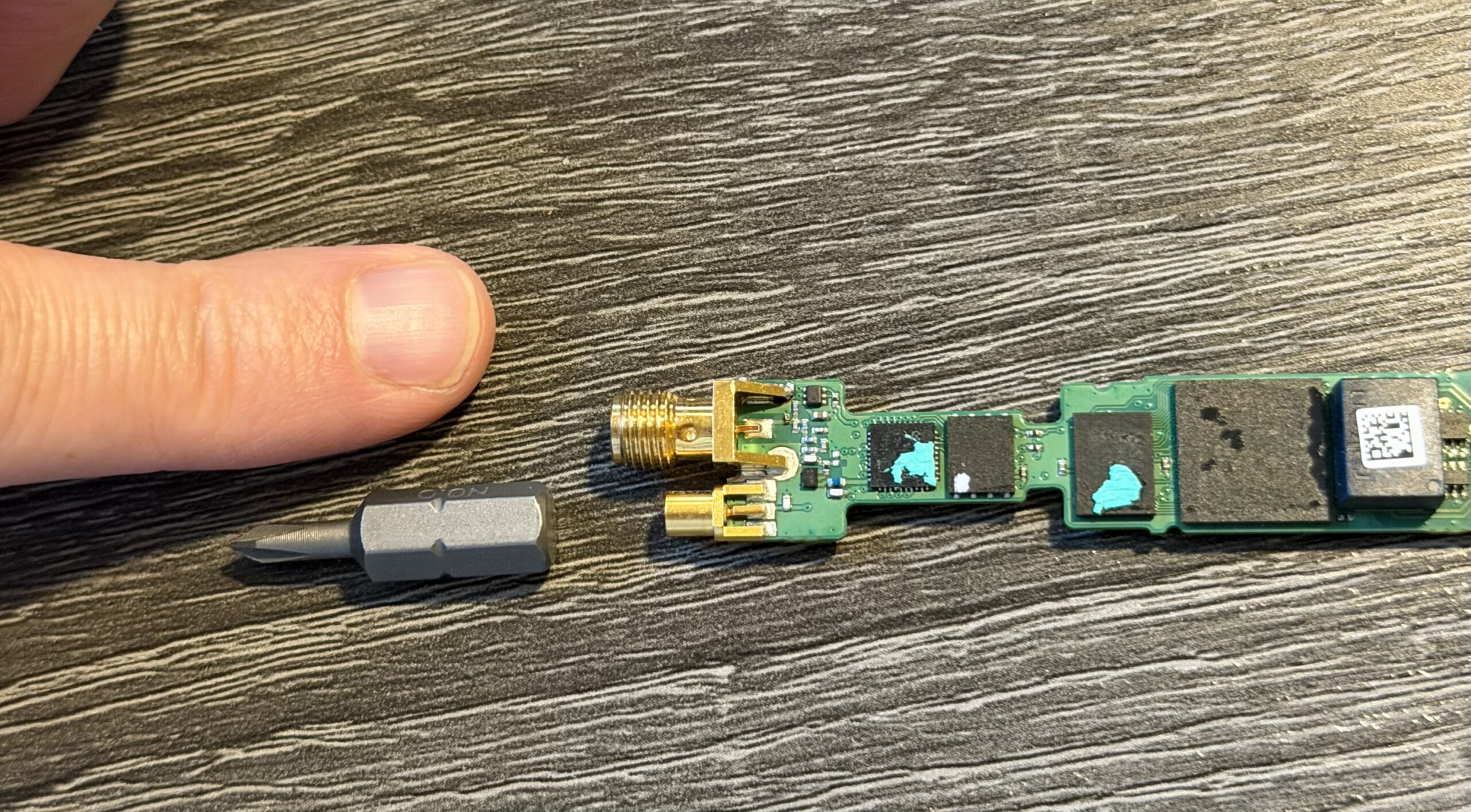
OSA-5401 PCB with resoldered GNSS SMA connector, screwdriver bit for scale

And installed in port F2 of a Brocade ICX6430-C12 switch, GPS antenna connected:
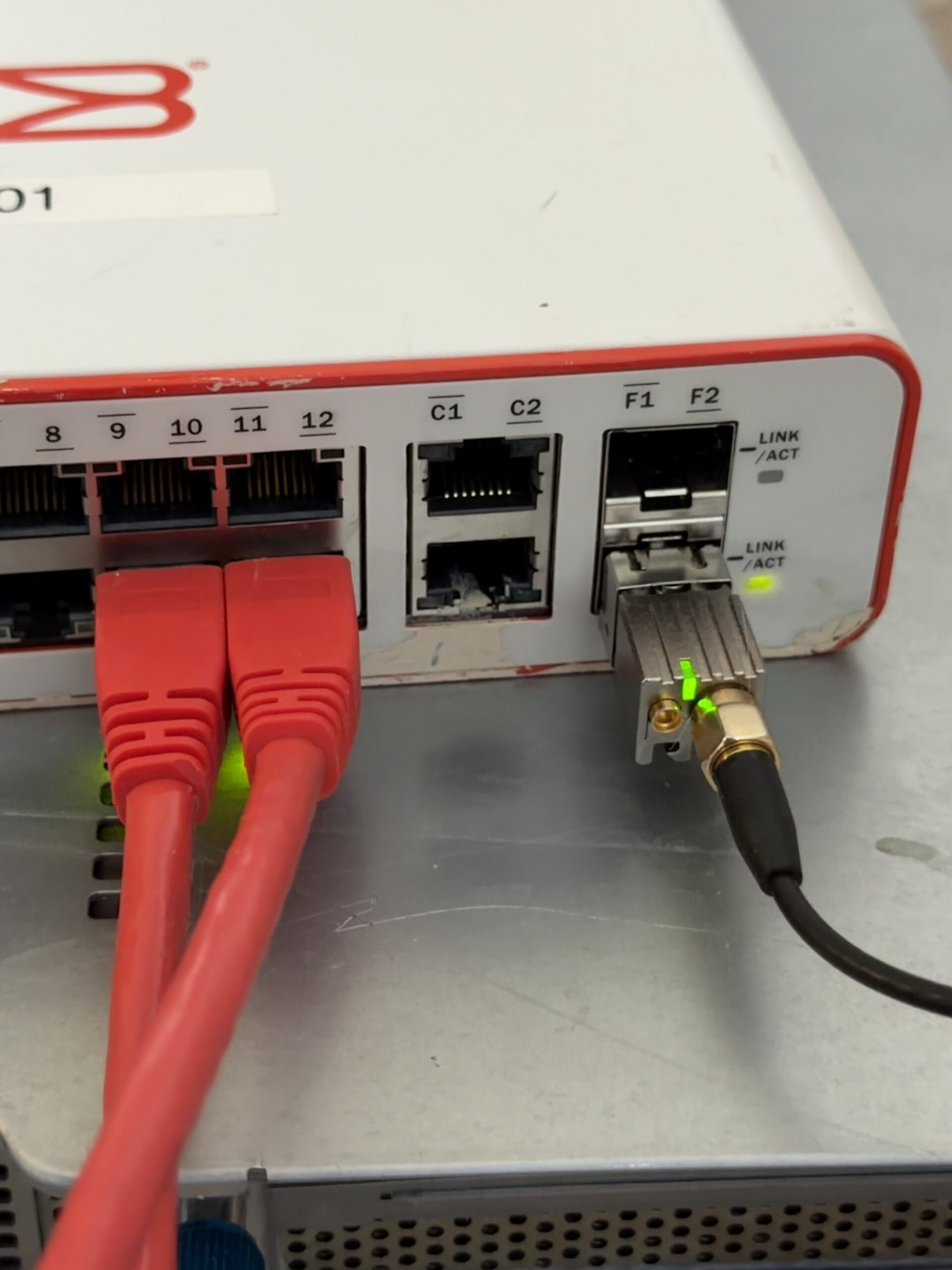
OSA-5401 installed in a Brocade ICX6430-C12 SFP port with GPS antenna

I also have a BH3SAP GPSDO that I picked up for about $70 on eBay – one of those Chinese units with an OX256B OCXO and an STM32 Blue Pill microcontroller. There’s a great thread on EEVBlog about these. I soldered some jumper wires to the MCU PPS output and connected it to GPIO 18 on my Raspberry Pi 5. I’ve been running custom firmware on it (based on fredzo’s gpsdo-fw) with some modifications for telemetry and flywheel display.

The whole mess wired together – GPSDO PPS jumper wires running to the Pi 5’s GPIO header:
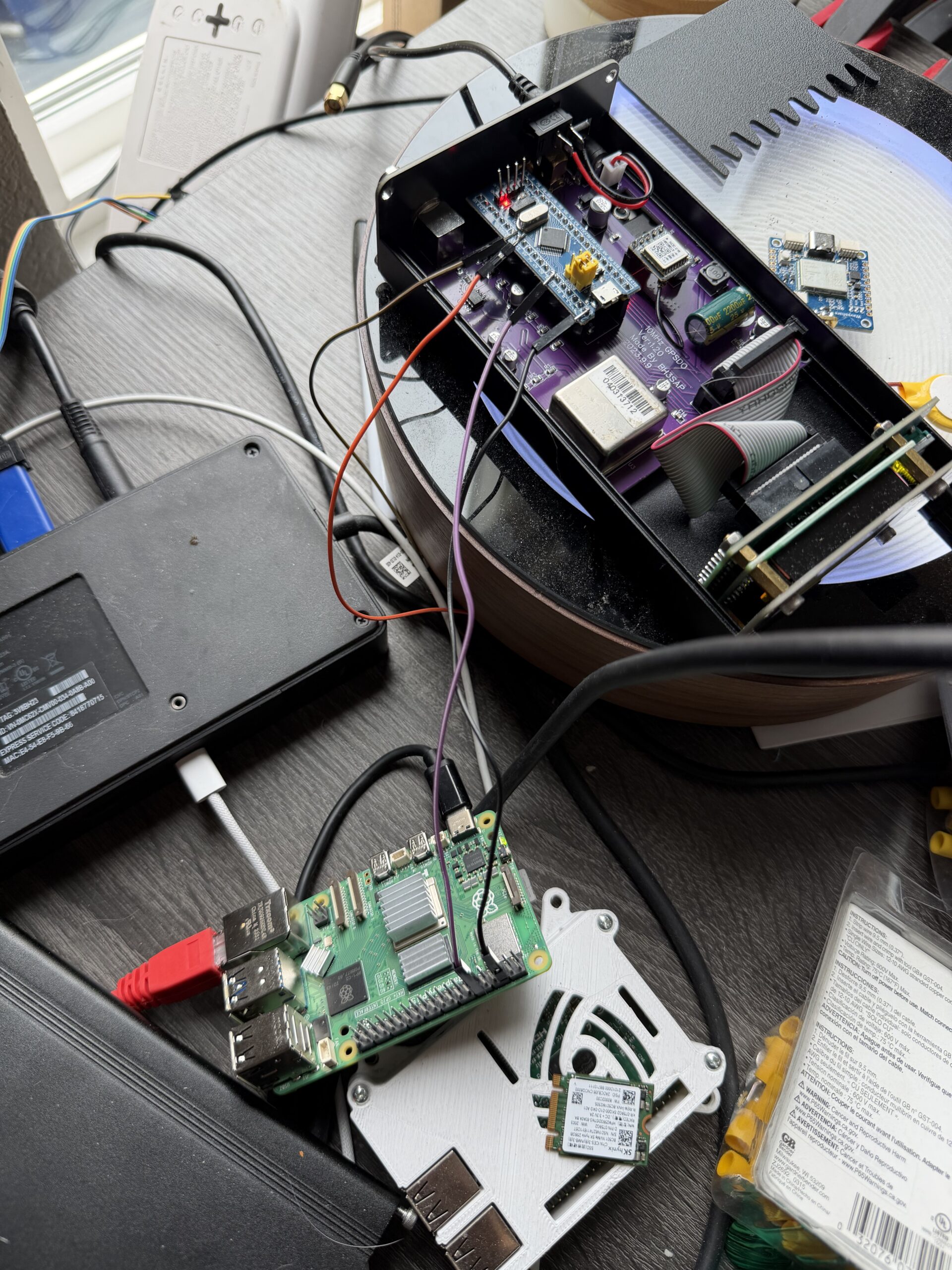
GPSDO connected to Raspberry Pi 5 via PPS jumper wires

The Raspberry Pi 5 has hardware timestamping on its Ethernet NIC, which gives it a /dev/ptp0 PTP hardware clock (PHC). This is critical – without hardware timestamping, PTP is no better than NTP. The Pi 5’s Ethernet controller supports it natively.

Here’s the setup:

  • OSA-5401 ($29) – GPS-disciplined PTP grandmaster, plugged into an SFP port on my network switch
  • BH3SAP GPSDO (~$70) – GPS-disciplined OCXO, PPS output wired to Pi 5 GPIO
  • Raspberry Pi 5 – running ptp4l (for PTP) and chronyd (for everything else)
  • Total cost of timing hardware: ~$100

The Software Stack

The timing chain has two hops:

  1. ptp4l receives PTP sync messages from the OSA-5401 over Ethernet and disciplines the Pi’s PTP hardware clock (/dev/ptp0)
  2. chrony reads the hardware clock as a refclock and disciplines the system clock

ptp4l configuration (/etc/linuxptp/ptp4l-osa.conf):

[global]
slaveOnly		1
domainNumber		24
network_transport	L2
time_stamping		hardware
delay_mechanism		E2E
clock_servo		pi
logging_level		6
summary_interval	0

twoStepFlag		1
first_step_threshold	0.00002
step_threshold		0.0
max_frequency		900000000
sanity_freq_limit	200000000

ptp_dst_mac		01:1B:19:00:00:00
p2p_dst_mac		01:80:C2:00:00:0E

[eth0]

The chrony refclock configuration for PTP (/etc/chrony/conf.d/ptp-osa.conf):

# OSA-5401 via ptp4l -> PHC0
# ptp4l disciplines /dev/ptp0 to PTP timescale (TAI)
# tai lets chrony apply the current TAI-UTC offset from its leap second table
refclock PHC /dev/ptp0 refid PTP dpoll -4 poll 0 filter 5 precision 1e-9 tai

A few things worth noting:

  • tai tells chrony the PHC is on TAI timescale and to automatically apply the current TAI-UTC offset (currently 37 seconds). This is better than hardcoding offset -37 because it auto-updates if a leap second is ever announced again.
  • dpoll -4 means chrony reads the PHC 16 times per second. I initially had this at dpoll 0 (once per second), but a tcpdump revealed the OSA-5401 is actually sending PTP sync messages at 16 Hz, not 1 Hz. So there’s fresh data to read.
  • filter 5 takes the median of 5 consecutive reads, rejecting outliers.
  • precision 1e-9 tells chrony the refclock is accurate to 1 nanosecond, which tightens the error bounds that chrony uses in source selection.

The Bug: Why Chrony Refused to Use the Better Source

When I first got this all running, I had both PPS (from the GPSDO) and PTP (from the OSA-5401) configured as refclocks. The GPSDO had lost GPS lock overnight and had been flywheeling for about 12 hours. PTP was clearly the better source – lower jitter, independent GPS reference. But chrony stubbornly stayed on PPS.

Here’s what chronyc sources showed:

MS Name/IP address         Stratum Poll Reach LastRx Last sample
===============================================================================
#* PPS                           0   2   377     5   -114ns[ -132ns] +/-  101ns
#x PTP                           0   2   377     3    -59us[  -59us] +/-  101ns

PPS was selected (*) and PTP was marked x – “may be in error.” But PTP wasn’t in error. The GPSDO had drifted 59 microseconds during 12 hours of flywheel, and chrony was faithfully following it off a cliff.

The culprit was in the PPS refclock config:

refclock PPS /dev/pps0 refid PPS dpoll 0 poll 2 filter 3 precision 1e-7 prefer trust

That trust flag is nuclear. It tells chrony: “this source is always correct – never classify it as a falseticker.” Combined with prefer, chrony would choose PPS no matter how much every other source disagreed with it. Three sources (PTP, pi-ntp, pfsense) all agreed the system clock was off by ~59 μs, but chrony trusted PPS absolutely and marked PTP as suspicious instead.

The fix was simple: remove trust. And after some more testing, remove prefer too. Let chrony’s selection algorithm do its job. As soon as I did that:

MS Name/IP address         Stratum Poll Reach LastRx Last sample
===============================================================================
#- PPS                           0   2    17     1    +59us[  +59us] +/-  101ns
#* PTP                           0   2    37     2    +22ns[  -83ns] +/-   18ns

PTP immediately took over. PPS correctly demoted to - (valid but not selected), showing +59 μs offset – the accumulated GPSDO flywheel drift.

Here’s the full day of refclock data. The top panel is in microseconds – you can see PTP sitting at +60 μs the whole morning because the system clock was following the drifting GPSDO. Then the fix lands around 08:30 MDT and everything snaps into place. The bottom panel zooms into the post-fix period in nanoseconds:
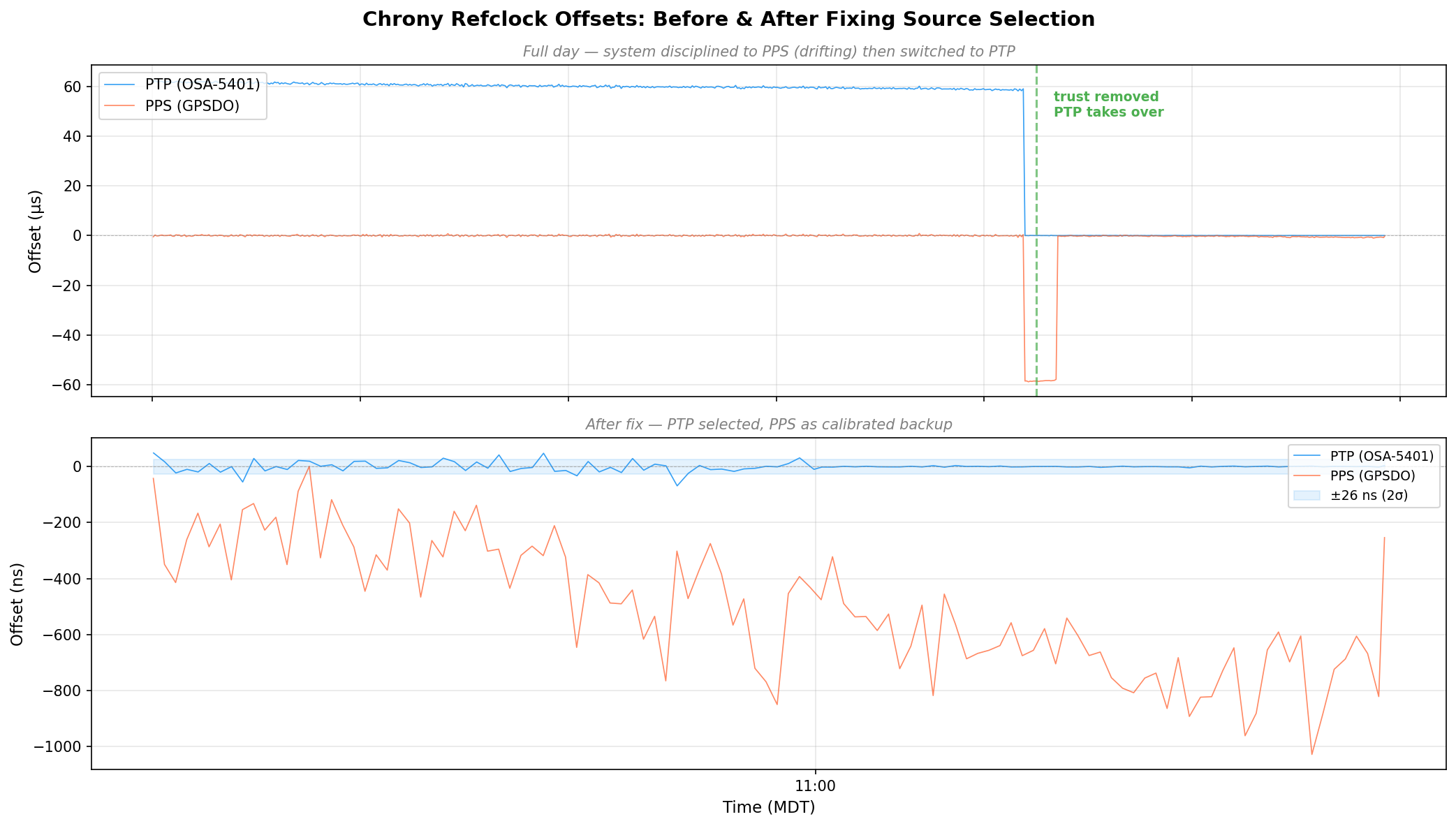
Chrony refclock offsets before and after fixing source selection - PTP drops from 60μs to near-zero
Chrony refclock offsets before and after fixing source selection – PTP drops from 60μs to near-zero

Discovering the 58.3 Microsecond MCU Bias

Once the GPSDO regained GPS lock, I expected PPS to converge back toward PTP. It didn’t. It settled at a rock-solid +58 μs offset with 474 ns standard deviation. Locked, stable, just… late.

The BH3SAP GPSDO doesn’t pass the GPS module’s PPS signal directly to the output. It goes through the STM32 microcontroller – GPIO interrupt, some processing, then the MCU asserts the output pin. And traverses a jumper wire with questionable soldering. That path adds latency (and a not very clean edge). With PTP as ground truth, I could now measure exactly how much.

I pulled 500 samples from chrony’s refclock log and crunched the numbers:

StatValue
Mean-58.319 μs
Median-58.372 μs
Std Dev787 ns
P5–P95-59.2 to -57.4 μs
Range9.8 μs peak-to-peak

A consistent 58.3 microsecond delay. Sub-microsecond jitter – the MCU interrupt path is deterministic, just slow. The fix is a static offset in the chrony config:

refclock PPS /dev/pps0 refid PPS dpoll 0 poll 2 filter 3 precision 1e-7 offset 0.0000583

After applying the offset and restarting chrony:

MS Name/IP address         Stratum Poll Reach LastRx Last sample
===============================================================================
#- PPS                           0   2    37     4   +425ns[ +423ns] +/-  101ns
#* PTP                           0   2    77     4    -24ns[  -26ns] +/-   18ns

PPS went from +58 μs to +425 ns. The two sources now agree to within a microsecond, and PPS is a legitimate backup if PTP ever drops.

The Results: ±26 Nanoseconds

After tuning the PTP refclock parameters (dpoll -4, poll 0, filter 5), here are the final numbers:

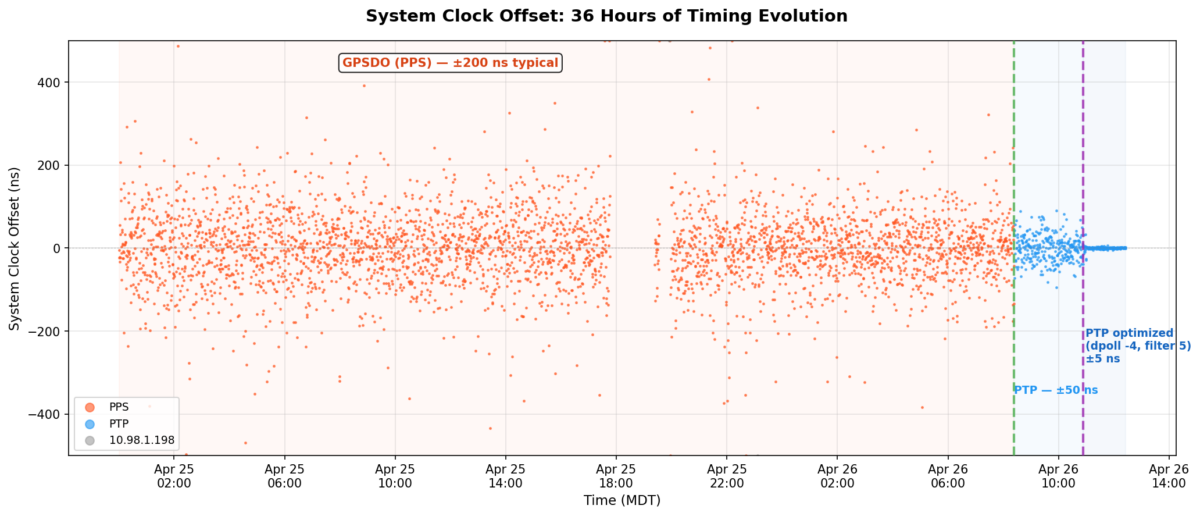
But first, here’s the big picture. This is 36 hours of chrony’s tracking offset – the actual error between the system clock and whatever reference chrony was using at the time:
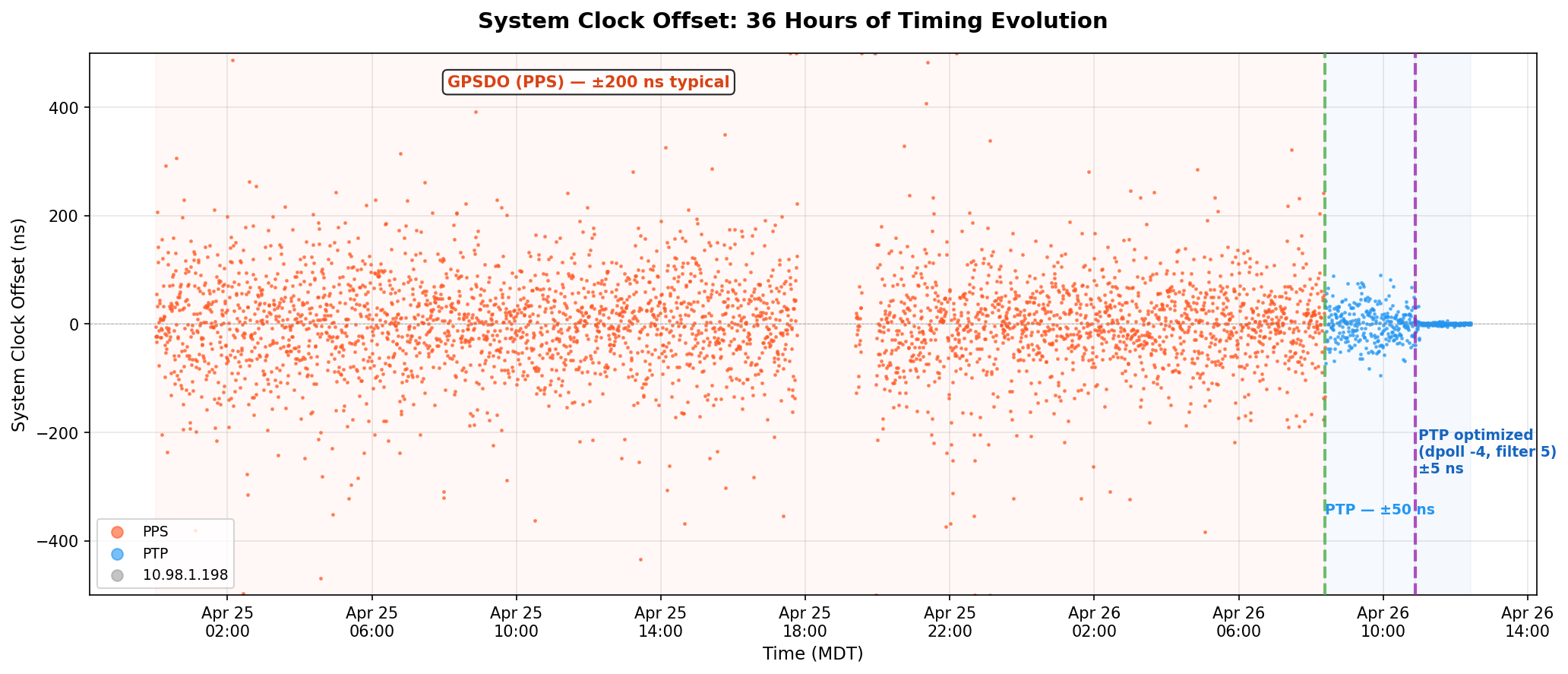
System clock offset over 36 hours - PPS scattered at ±200 ns, then PTP collapses it to a thin line
System clock offset over 36 hours – PPS scattered at ±200 ns, then PTP collapses it to a thin line

The orange scatter is the GPSDO’s PPS running chrony for a day and a half – ±200 ns on a good minute, ±400 ns on a bad one. The green dashed line is the moment I removed trust and PTP took over. The purple line is when I cranked the polling rate to 16 Hz. After that, the data is a flat line at zero on this scale.

ptp4l (OSA-5401 → Pi hardware clock):

MetricValue
RMS offset11.8 ns
Max offset17 ns
Path delay3,160 ns

chrony (Pi hardware clock → system clock):

MetricValue
Std Dev5 ns
RMS offset4 ns
Frequency skew0.002 ppm

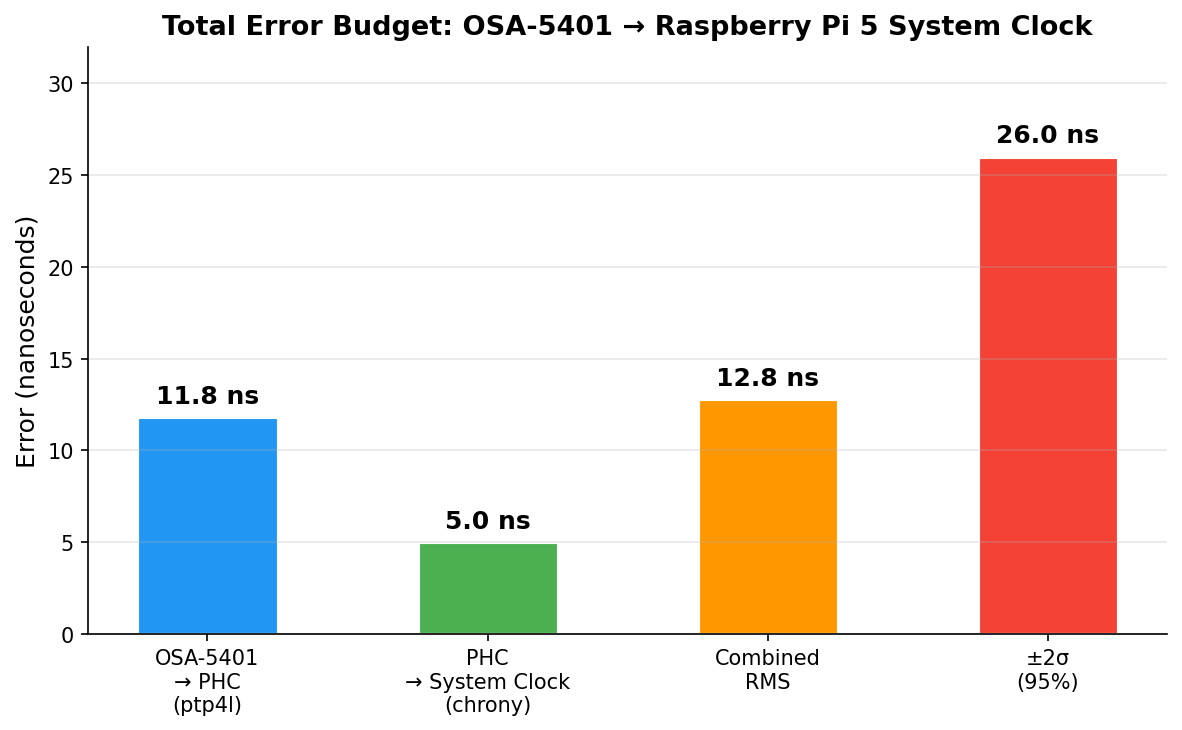
Combined error budget (root sum of squares):

LayerError
OSA-5401 → PHC (ptp4l)11.8 ns
PHC → system clock (chrony)5.0 ns
Combined RMS12.8 ns
±2σ (95% confidence)±26 ns

For comparison, my Pi 3B NTP server that’s been running for years:

MetricPi 3B (GPS PPS + NTP)Pi 5 (PTP + OSA-5401)
RMS offset182 ns4 ns
Std Dev312 ns5 ns
2σ bound~±600 ns±26 ns
Improvementbaseline~45x better
Error budget breakdown - ptp4l dominates at 11.8 ns, chrony adds 5 ns, combined 12.8 ns RMS
Error budget breakdown – ptp4l dominates at 11.8 ns, chrony adds 5 ns, combined 12.8 ns RMS

And here’s the distribution of 57,915 PTP offset samples after tuning. Mean of 2.9 ns, tight Gaussian centered right on zero:
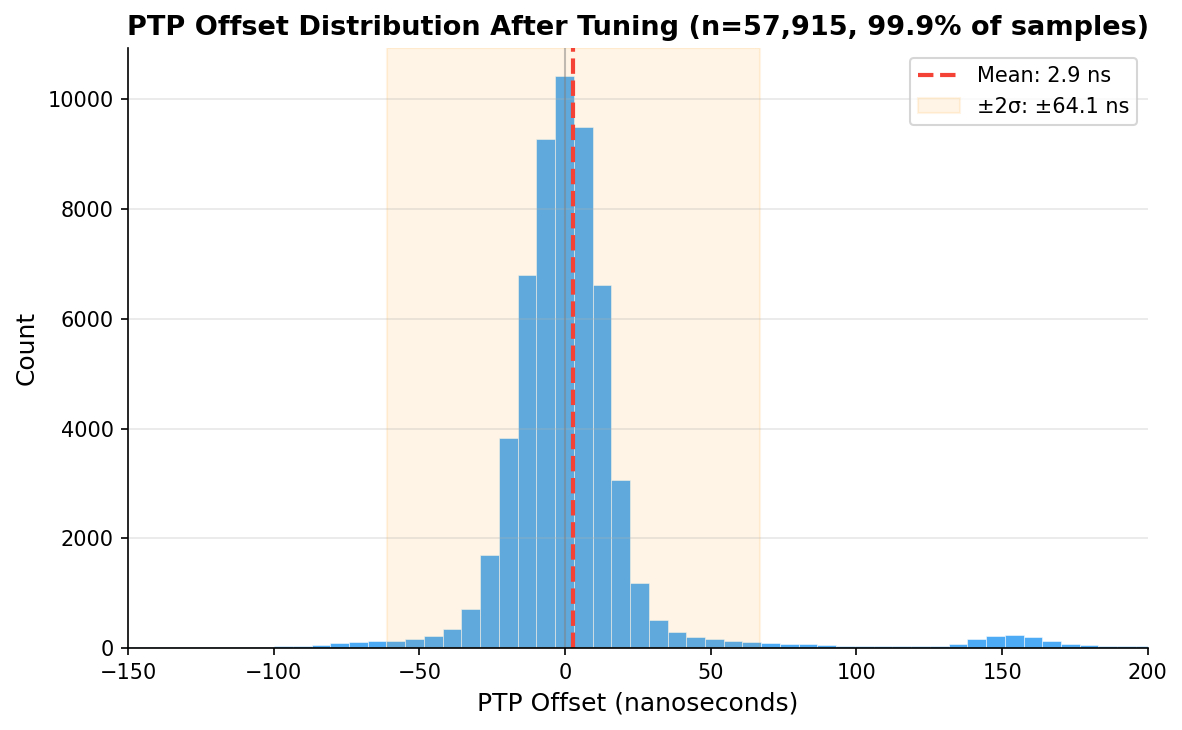
PTP offset histogram after tuning - 57,915 samples, mean 2.9 ns
PTP offset histogram after tuning – 57,915 samples, mean 2.9 ns

Checking Our Work: What Does the Raw Data Actually Say?

Those numbers above come from what the servos report. ptp4l prints a 1 Hz RMS summary. chrony’s sourcestats shows the standard deviation of its filtered, averaged output. Both are honest numbers, but they’re the numbers after each servo has done its best to smooth things out. What does the raw measurement data look like?

I pulled 110 minutes of overlapping data – ptp4l’s 1 Hz journal summaries and chrony’s 16 Hz raw refclock offset log – and computed 1-minute rolling statistics for each layer, then combined them as root sum of squares:
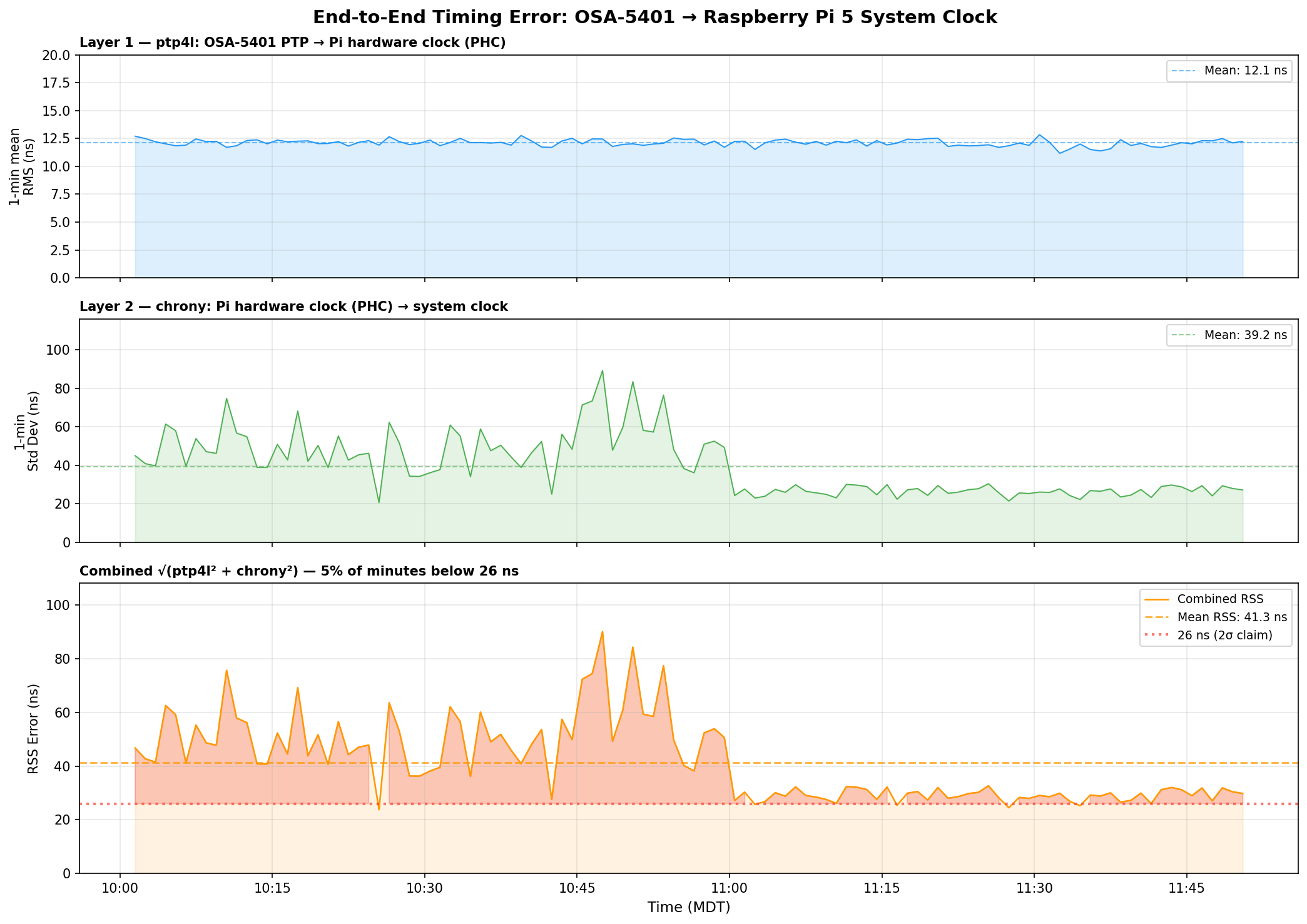
End-to-end timing error analysis - ptp4l at 12 ns, chrony raw jitter at 39 ns, combined RSS at 41 ns
End-to-end timing error analysis – ptp4l at 12 ns, chrony raw jitter at 39 ns, combined RSS at 41 ns

Three things jump out:

ptp4l is the stable one. Layer 1 (OSA-5401 → PHC) sits at 12.1 ns mean RMS and barely moves. The FPGA doing the hardware timestamping in the OSA-5401 earns its keep here – there’s just not much noise to begin with.

chrony’s raw readings are noisier than its filtered output suggests. The 16 Hz PHC reads have a 39 ns mean standard deviation per minute, with spikes up to 90 ns. But chrony’s sourcestats reports 5 ns – because the median-of-5 filter and the PI servo smooth that out before it touches the system clock. Both numbers are real; they measure different things.

The honest combined number is ±40–50 ns typical, not ±26 ns. The ±26 ns figure from chrony’s tracking output reflects the post-filter error – what the system clock actually experiences after chrony has done its smoothing. The raw measurement chain has more jitter than that. You can see the combined RSS settling toward 27–30 ns in the last hour as the servo tightened, but 40 ns is a fairer typical value.

Even at ±50 ns, that’s still 4× better than the Pi 3B’s ±200 ns. And the trend in the last hour suggests it keeps improving as chrony accumulates more data and tightens its frequency estimate.

GPSDO Flywheel Testing

With the PTP source providing a known-good reference, I can now characterize the GPSDO’s holdover performance. I unplugged the GPSDO’s GPS antenna and let it flywheel on its OCXO. Early results after the first hour showed drift still buried in the noise floor – under 100 ns/hr. The OX256B OCXO in this $70 unit might actually be decent. I’m collecting data for a longer run and will update this post (or write a follow-up) with the full holdover curve.

The dream setup is adding a DS18B20 temperature sensor directly to the OCXO case so I can correlate thermal drift with the oscillator’s frequency offset. That would let me separate temperature-driven drift from aging – but that’s a project for another weekend.

The Journey: Five Years, Six Orders of Magnitude

YearPostMethodAccuracy
2021USB GPS NTPNTP over USB serial~1 ms
2021GPS PPS NTPGPIO PPS + chrony~1 μs
2025Revisiting in 2025Tuned chrony + Pi 3B~200 ns
2025Thermal managementCPU temp stabilization~86→16 ns RMS
2026This postPTP + OSA-5401±26 ns

From a $12 USB GPS dongle to a $29 telecom SFP module. From milliseconds to nanoseconds. The total cost of the timing hardware in my current setup is about $100, and it’s achieving accuracy that used to require five-figure test equipment.

The next step down would be sub-nanosecond, and that requires White Rabbit – dedicated hardware, specialized SFP transceivers, and budgets measured in tens of thousands. For commodity Ethernet and general-purpose Linux, ±26 nanoseconds is pretty much the floor.

I think I’m done. (For now.) At least, that’s what I told my wife.

Configs for Reference

PTP refclock (/etc/chrony/conf.d/ptp-osa.conf)

# OSA-5401 via ptp4l -> PHC0
# ptp4l disciplines /dev/ptp0 to PTP timescale (TAI)
# tai lets chrony apply the current TAI-UTC offset from its leap second table
refclock PHC /dev/ptp0 refid PTP dpoll -4 poll 0 filter 5 precision 1e-9 tai

PPS refclock (/etc/chrony/conf.d/pps-gpsdo.conf)

# GPSDO 1 Hz PPS on GPIO 18
# dpoll 0 = read every pulse (1 Hz)
# filter 3 = median of 3 samples (odd count for true median)
# poll 2 = 4s loop update (2^2=4 >= filter 3)
# offset = MCU PPS delay compensation (58.3us measured against PTP)
refclock PPS /dev/pps0 refid PPS dpoll 0 poll 2 filter 3 precision 1e-7 offset 0.0000583

# Accurate LAN NTP server - coarse time for PPS second identification
server 10.98.1.198 iburst minpoll 4 maxpoll 6

ptp4l service

/usr/sbin/ptp4l -f /etc/linuxptp/ptp4l-osa.conf -i eth0

chrony main config highlights

log tracking measurements statistics refclocks
maxupdateskew 0.1
rtcsync
makestep 1 -1
leapsectz right/UTC
hwtimestamp *

The hwtimestamp * line enables hardware timestamping on all interfaces, and leapsectz right/UTC is required for the tai refclock option to work correctly.

Categories
Linux NTP PTP Raspberry Pi

Revisiting Microsecond Accurate NTP for Raspberry Pi with GPS PPS in 2025

Introduction

Almost four years ago, I wrote the original post to this seriesMicrosecond accurate NTP with a Raspberry Pi and PPS GPS. Some things have changed since then, some haven’t. PPS is still an excellent way to get a microsecond accurate Raspberry Pi. Some of the commands and configurations have changed. So let’s run through this again now in 2025. This will basically be the same post but with some updated commands and material suggestions so you can use your Raspberry Pi 5 as a nanosecond accurate PTP (precision time protocol – IEEE 1588) grandmaster.

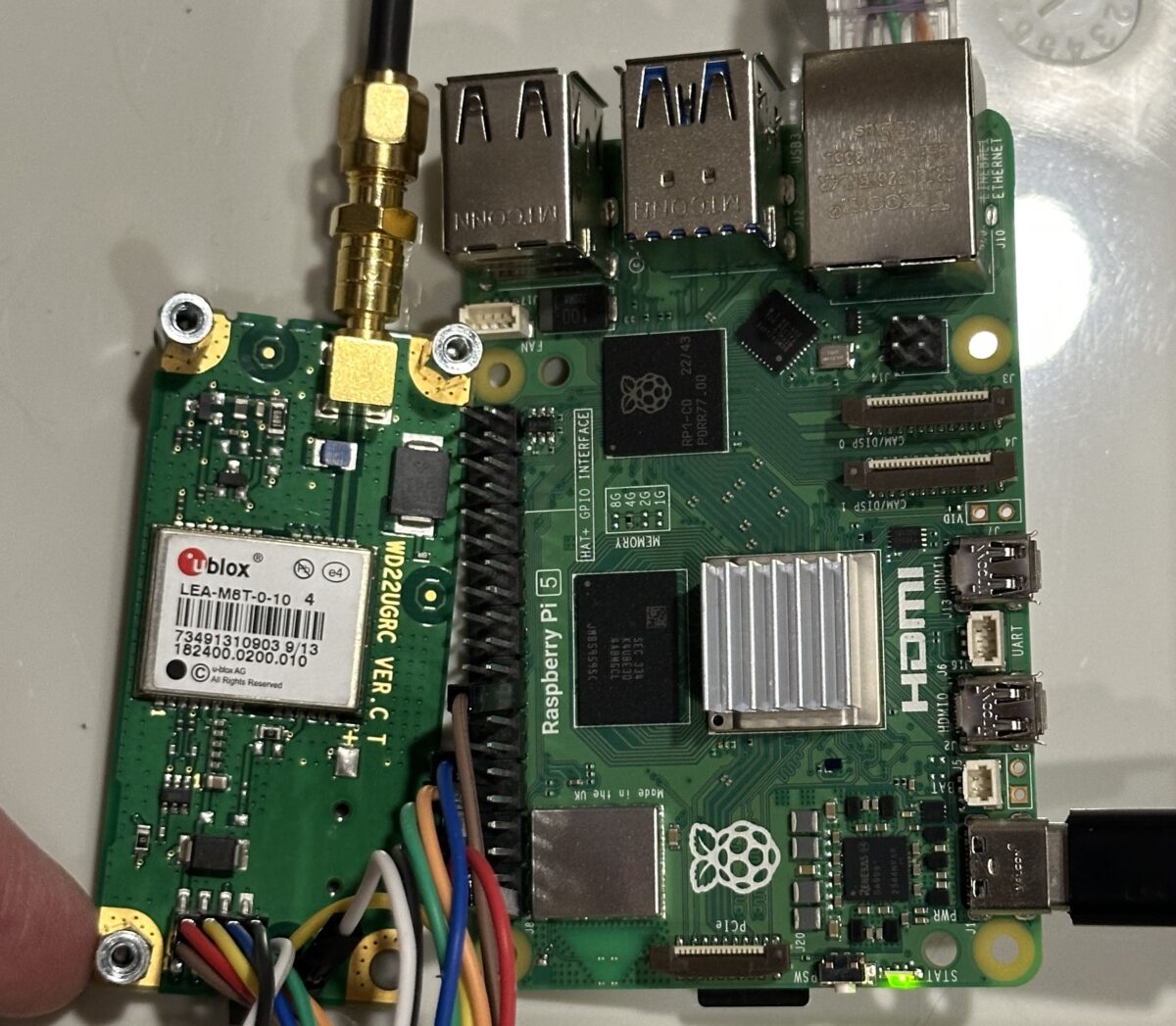
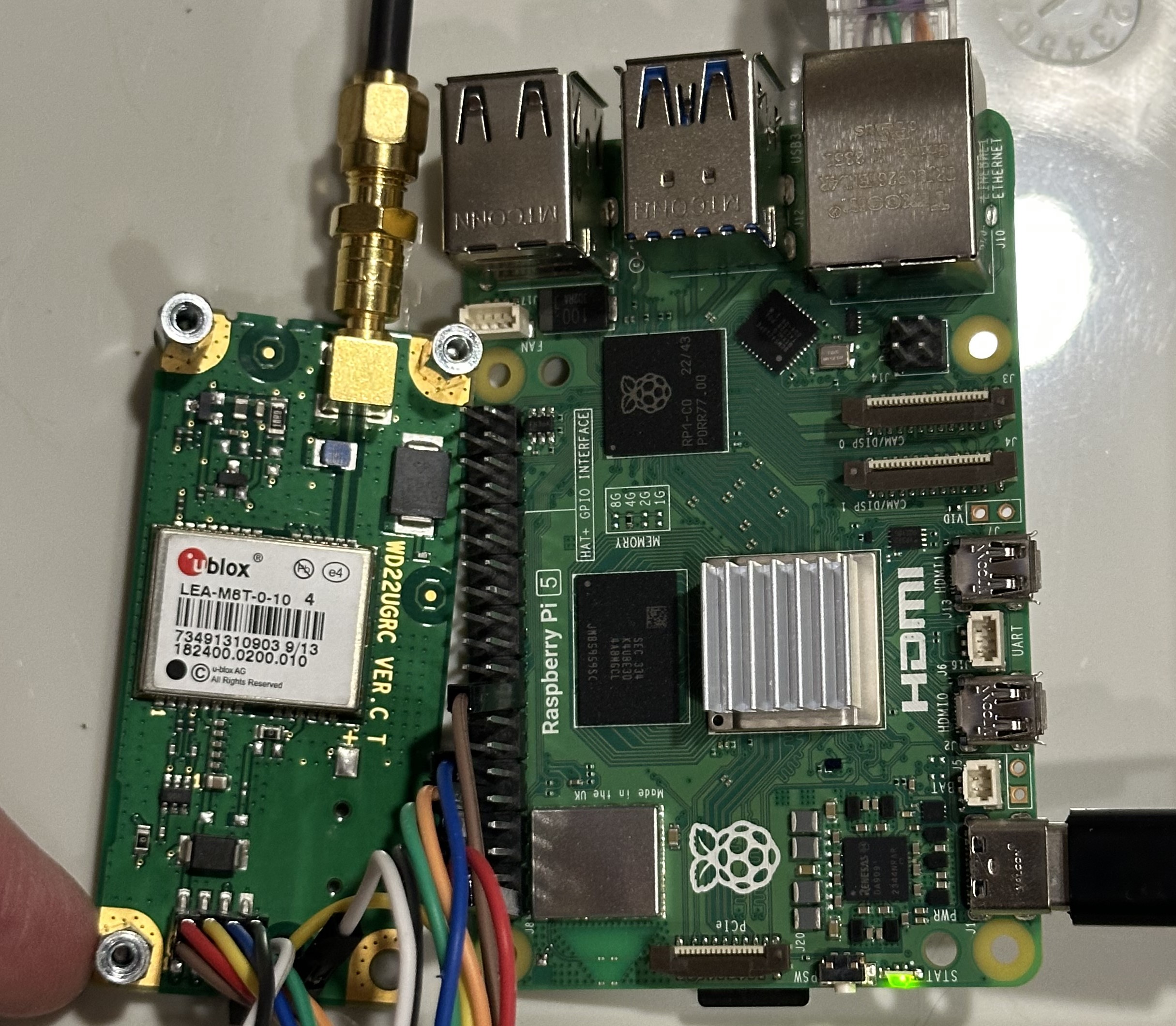
ublox LEA-M8T sending PPS signals to Raspberry Pi 5 for extremely precise timing
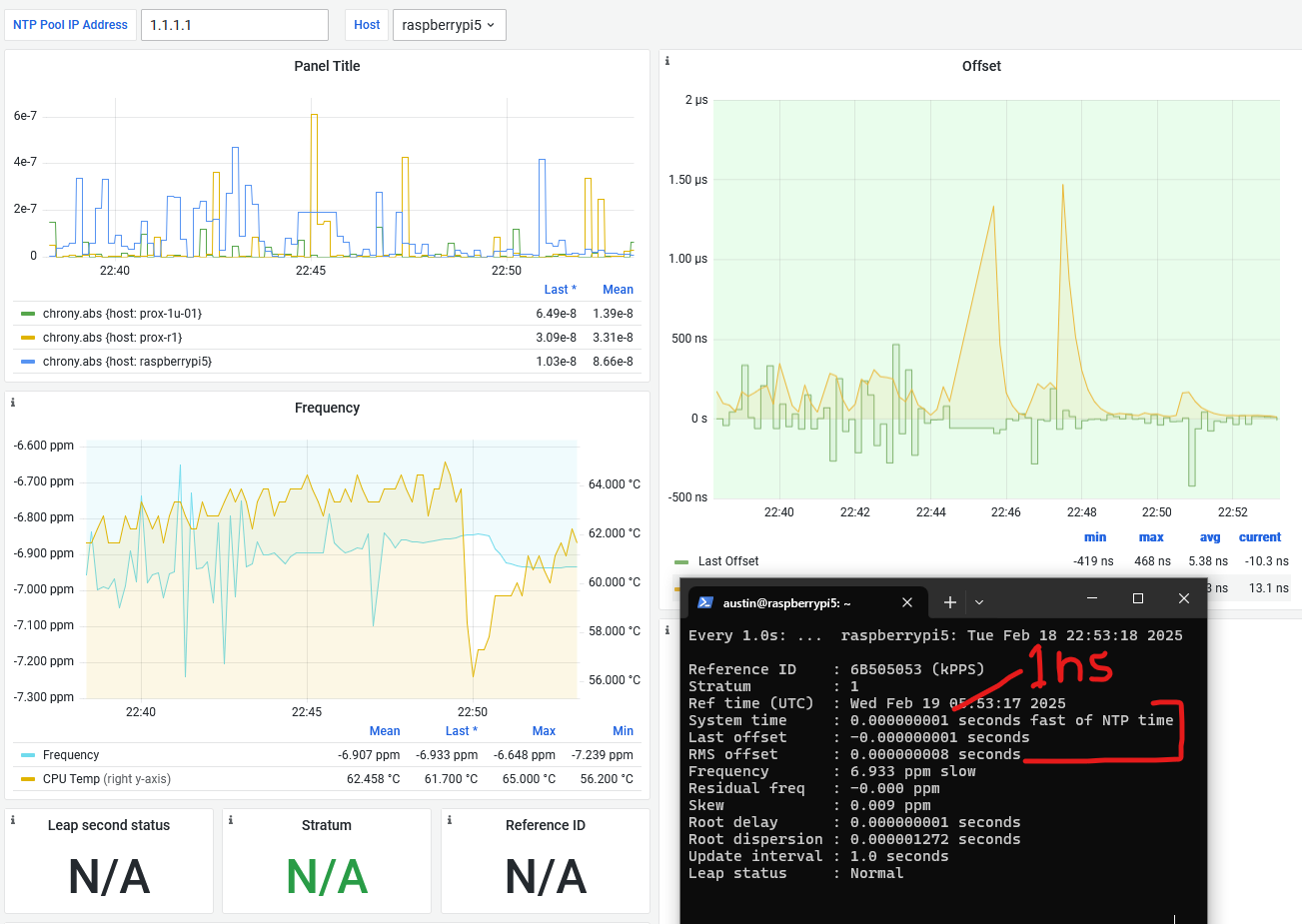
testing various Chrony/ublox configurations evening of Feb 18 2025 – acheived 1 nanosecond (1 nanosecond = 0.000000001 seconds) accuracy! this was a somewhat lucky capture but the Pi is routinely in single digits, and skew hovers around 0.001-0.002 ppm error, which is 1-2 ppb error on the Pi clock

Original Introduction

Lots of acronyms in that title. If I expand them out, it says – “microsecond accurate network time protocol with a Raspberry Pi and global positioning system pulse per second”. What it means is you can get super accurate timekeeping (1 microsecond = 0.000001 seconds) with a Raspberry Pi and a GPS receiver that spits out pulses every second. By following this guide, you will your very own Stratum 1 NTP server at home!

Why would you need time this accurate at home?

You don’t. There aren’t many applications for this level of timekeeping in general, and even fewer at home. But this blog is called Austin’s Nerdy Things so here we are. Using standard, default internet NTP these days will get your computers to within 2-4 milliseconds of actual time (1 millisecond = 0.001 seconds). Pretty much every internet connected device these days has a way to get time from the internet. PPS gets you to the next SI prefix in terms of accuracy (milli -> micro), which means 1000x more accurate timekeeping. With some other tricks, you can get into the nanosecond range (also an upcoming post topic!).

Materials Needed

  • Raspberry Pi 5 – the 3’s ethernet is hung off a USB connection so while the 3 itself can get great time, it is severely limited in how accurate other machines can sync to it. Raspberry Pi 4 would work decently. But Raspberry Pi 5 supports Precision Time Protocol (PTP), which can get synchronizations down to double-digit nanoseconds. So get the 5. Ideally, your Pi isn’t doing much other than keeping time, so no need to get one with lots of memory.
  • A timing-specific GPS module – these have algorithms tuned to provide extremely precise PPS signals. For example, by default, they prefer satellites with higher elevations, and have special fixed position modes where they know they aren’t moving so they focus on providing the best time possible. u-blox devices, for instance, have a “survey-in” mode where the positions are essentially averaged over a specified amount of time and standard deviations to a singular, fixed location. Other options:
  • (slightly optional but much better results) – GPS antenna
  • Wires to connect it all up (5 wires needed – 5V/RX/TX/GND/PPS)
  • project box to stuff it all in – Temperature stability is super important for accurate time. There is a reason some of most accurate oscillators are called oven controlled crystal oscillators (OCXO) – they are extremely stable. This box keeps airflow from minutely cooling/heating the Pi.
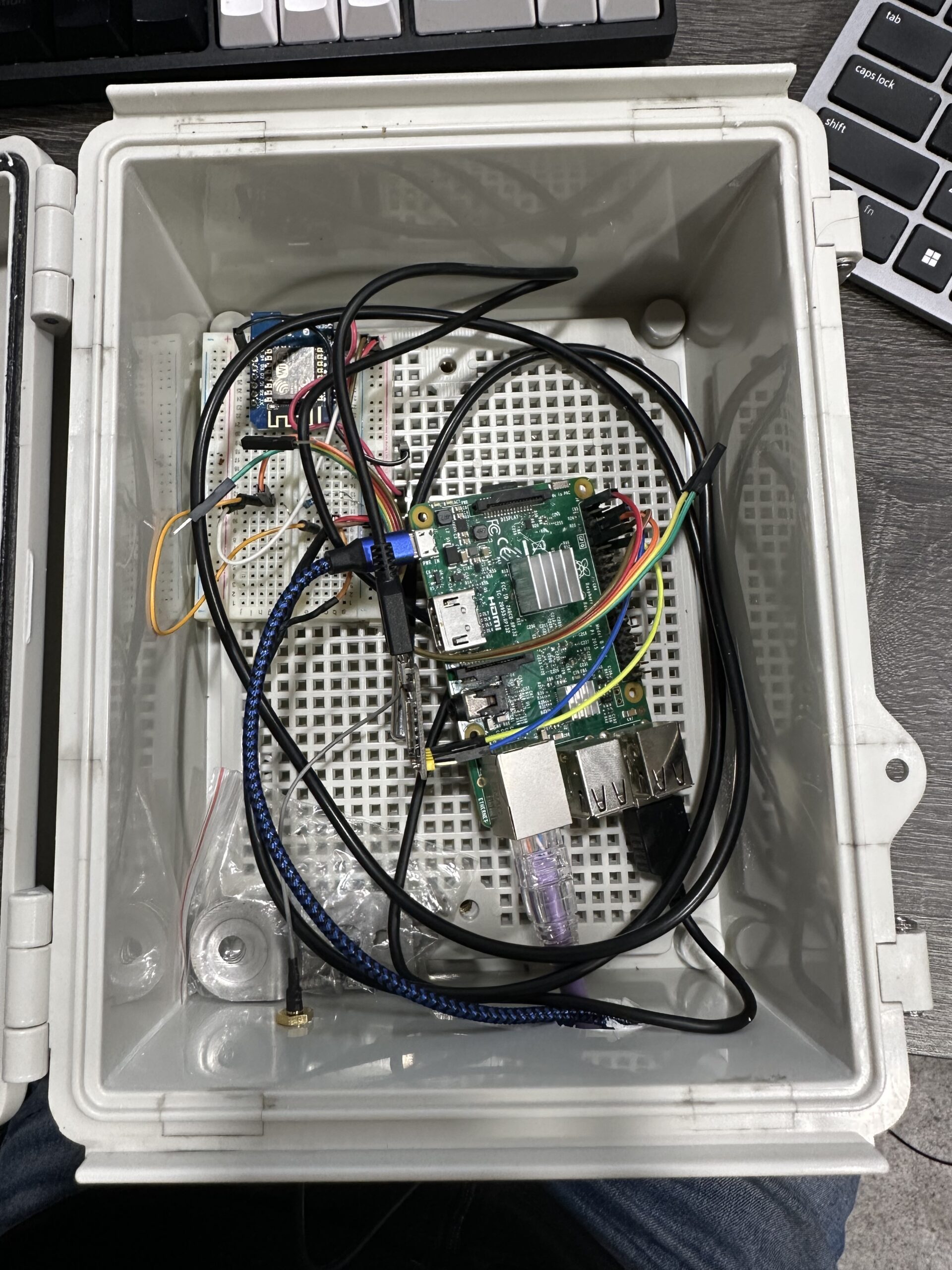
raspberry pi for timing with PPS GPS NTP in project box with ds18b20 temperature sensor
I did say “stuffed” right? not joking here… I stuffed some newspaper on top to minimize airflow then closed it up. caption: raspberry pi for timing with PPS GPS NTP in project box with ds18b20 temperature sensor

Steps

0 – Update your Pi and install packages

This NTP guide assumes you have a Raspberry Pi ready to go.

You should update your Pi to latest before basically any project. We will install some other packages as well. pps-tools help us check that the Pi is receiving PPS signals from the GPS module. We also need GPSd for the GPS decoding of both time and position (and for ubxtools which we will use to survey-in). I use chrony instead of NTPd because it seems to sync faster than NTPd in most instances and also handles PPS without compiling from source (the default Raspbian NTP doesn’t do PPS) Installing chrony will remove ntpd.

sudo apt update
sudo apt upgrade
# this isn't really necessary, maybe if you have a brand new pi
# sudo rpi-update
sudo apt install pps-tools gpsd gpsd-clients chrony

1 – Add GPIO and module info where needed

In /boot/firmware/config.txt (changed from last post), add ‘dtoverlay=pps-gpio,gpiopin=18’ to a new line. This is necessary for PPS. If you want to get the NMEA data from the serial line, you must also enable UART and set the initial baud rate.

########## NOTE: at some point, the config file changed from /boot/config.txt to /boot/firmware/config.txt

sudo bash -c "echo '# the next 3 lines are for GPS PPS signals' >> /boot/firmware/config.txt"
sudo bash -c "echo 'dtoverlay=pps-gpio,gpiopin=18' >> /boot/firmware/config.txt"
sudo bash -c "echo 'enable_uart=1' >> /boot/firmware/config.txt"
sudo bash -c "echo 'init_uart_baud=9600' >> /boot/firmware/config.txt"

In /etc/modules, add ‘pps-gpio’ to a new line.

sudo bash -c "echo 'pps-gpio' >> /etc/modules"

Reboot

sudo reboot

Let’s also disable a bunch of stuff we don’t need:

2 – wire up the GPS module to the Pi

Disclaimer – I am writing this guide with a combination of Raspberry Pi 4/5 and Adafruit Ultimate GPS module, but will swap out with the LEA-M8T when it arrives.

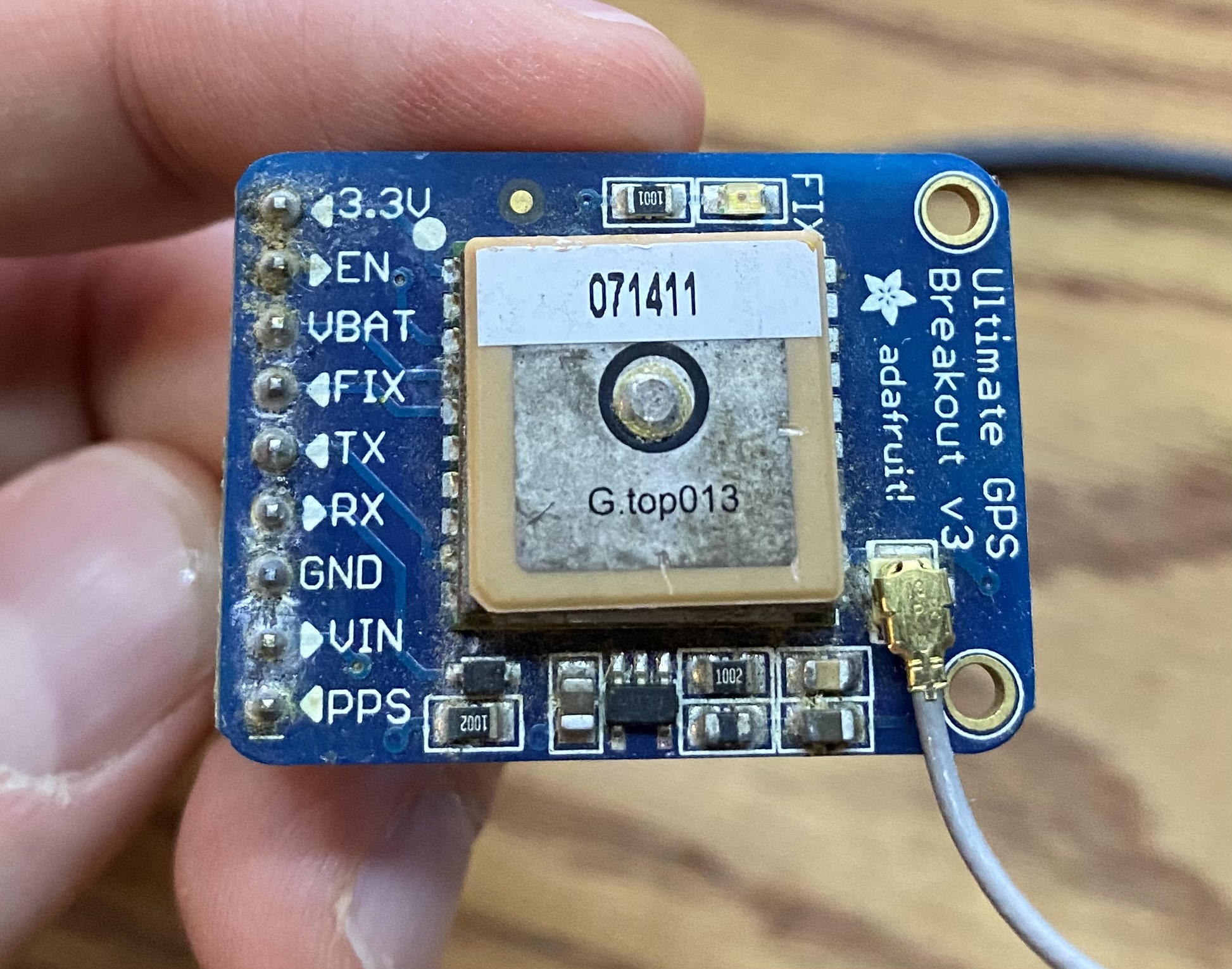
Pin connections:

  1. GPS PPS to RPi pin 12 (GPIO 18)
  2. GPS VIN to RPi pin 2 or 4
  3. GPS GND to RPi pin 6
  4. GPS RX to RPi pin 8
  5. GPS TX to RPi pin 10
  6. see 2nd picture for a visual
Adafruit Ultimate GPS Breakout V3

3 – enable serial hardware port

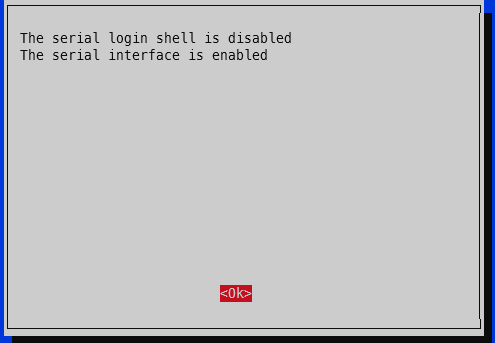
Run raspi-config -> 3 – Interface options -> I6 – Serial Port -> Would you like a login shell to be available over serial -> No. -> Would you like the serial port hardware to be enabled -> Yes.

screenshot showing raspberry serial port (UART) enabled

4 – verify PPS

First, check that PPS is loaded. You should see a single line showing pps_gpio:

lsmod | grep pps
austin@raspberrypi4:~ $ lsmod | grep pps
pps_gpio               12288  0

Now check for the actual PPS pulses. NOTE: you need at least 4 satellites locked on for PPS signal. The GPS module essentially has 4 unknowns – x, y, z, and time. You need three satellites minimum to solve x, y, and z and a forth for time. Exception for the timing modules – if they know their x, y, z via survey-in or fixed set location, they only need a single satellite for time!

sudo ppstest /dev/pps0
austin@raspberrypi4:~ $ sudo ppstest /dev/pps0
trying PPS source "/dev/pps0"
found PPS source "/dev/pps0"
ok, found 1 source(s), now start fetching data...
source 0 - assert 1739485509.000083980, sequence: 100 - clear  0.000000000, sequence: 0
source 0 - assert 1739485510.000083988, sequence: 101 - clear  0.000000000, sequence: 0
source 0 - assert 1739485511.000083348, sequence: 102 - clear  0.000000000, sequence: 0
source 0 - assert 1739485512.000086343, sequence: 103 - clear  0.000000000, sequence: 0
source 0 - assert 1739485513.000086577, sequence: 104 - clear  0.000000000, sequence: 0
^C
austin@raspberrypi4:~ $

5 – change GPSd boot options to start immediately

There are a couple options we need to tweak with GPSd to ensure it is available upon boot. This isn’t strictly necessary for PPS only operation, but if you want the general NMEA time information (i.e. not just the exact second marker from PPS), this is necessary.

Edit /etc/default/gpsd:

# USB might be /dev/ttyACM0
# serial might be /dev/ttyS0

# on raspberry pi 5 with raspberry pi os based on debian 12 (bookworm)
DEVICES="/dev/ttyAMA0 /dev/pps0"

# -n means start without a client connection (i.e. at boot)
GPSD_OPTIONS="-n"

# also start in general
START_DAEMON="true"

# Automatically hot add/remove USB GPS devices via gpsdctl
USBAUTO="true"

I’m fairly competent at using systemd and such in a Debian-based system, but there’s something about GPSd that’s a bit odd and I haven’t taken the time to figure out yet. So instead of enabling/restarting the service, reboot the whole Raspberry Pi.

sudo reboot

5 – check GPS for good measure

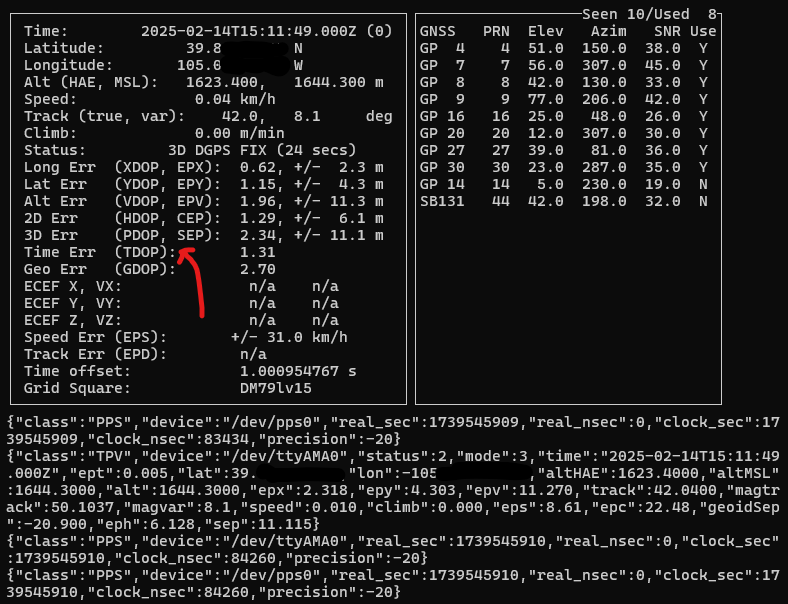
To ensure your GPS has a valid position, you can run gpsmon or cgps to check satellites and such. This check also ensures GPSd is functioning as expected. If your GPS doesn’t have a position solution, you won’t get a good time signal. If GPSd isn’t working, you won’t get any updates on the screen. The top portion will show the analyzed GPS data and the bottom portion will scroll by with the raw GPS sentences from the GPS module.

gpsmon is a bit easier to read for timing info, cgps is a bit easier to read for satellite info (and TDOP, timing dilution of precision, a measure of how accurate the GPS’s internal time determination is).

Here’s a screenshot from cgps showing the current status of my Adafruit Ultimate GPS inside my basement. There are 10 PRNs (satellites) seen, 8 used. It is showing “3D DGPS FIX”, which is the highest accuracy this module offers. The various *DOPs show the estimated errors. Official guides/docs usually say anything < 2.0 is ideal but lower is better. For reference, Arduplane (autopilot software for RC drones, planes) has a limit of 1.4 for HDOP. It will not permit takeoff with a value greater than 1.4. It is sort of a measure of how spread out the satellites are for that given measure. Evenly distributed around the sky is better for location, closer together is better for timing.

cgps
cgps screenshot showing 10 sats seen, 8 used, with a TDOP of 1.3
cgps showing 8 satellites used for this position determination, and a TDOP (time dilution of precision) of 1.31, which is decent. notably, cgps does not show the PPS offset

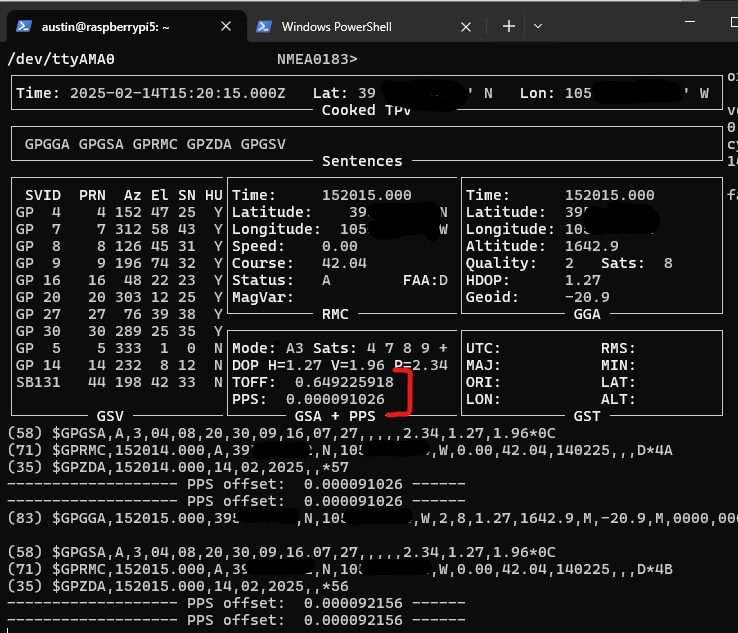
And for gpsmon, it shows both the TOFF, which is the time offset from the NMEA $GPZDA sentence (which will always come in late due to how long it takes the transmit the dozens of bytes over serial – example 79 byte sentence over 9600 bit per second link, which is super common for GPS modules = 79*(8 bits per byte + 1 start bit + 1 end bit)/9600 = 82.3 milliseconds) as well as the PPS offset. This particular setup is not actually using PPS at the moment. It also shows satellites and a few *DOPs but notably lacks TDOP.

gpsmon
gpsmon screenshot showing timeoff set as well as PPS offset
gpsmon showing 8 satellites used for the position with HDOP of 1.27. This indicates a decent position solution, but doesn’t say anything about the time solution.

Both gpsmon and cgps will stream the sentences received from the GPS module.

6 – configure chrony to use both NMEA and PPS signals

Now that we know our Raspberry Pi is receiving both the precision second marker (via PPS), as well as the time of day (TOD) data (via the NMEA $GPMRC and $GPZDA sentences), let’s set up chrony to use both sources for accurate time.

This can be done as a one step process, but it is better to gather some statistics about the delay on your own NMEA sentences. So, let’s add our reference sources and also enable logging for chrony.

In the chrony configuration file (/etc/chrony/chrony.conf), add the following near the existing server directives

# SHM refclock is shared memory driver, it is populated by GPSd and read by chrony
# it is SHM 0
# refid is what we want to call this source = NMEA
# offset = 0.000 means we do not yet know the delay
# precision is how precise this is. not 1e-3 = 1 millisecond, so not very precision
# poll 0 means poll every 2^0 seconds = 1 second poll interval
# filter 3 means take the average/median (forget which) of the 3 most recent readings. NMEA can be jumpy so we're averaging here
refclock SHM 0 refid NMEA offset 0.000 precision 1e-3 poll 0 filter 3

# PPS refclock is PPS specific, with /dev/pps0 being the source
# refid PPS means call it the PPS source
# lock NMEA means this PPS source will also lock to the NMEA source for time of day info
# offset = 0.0 means no offset... this should probably always remain 0
# poll 3 = poll every 2^3=8 seconds. polling more frequently isn't necessarily better
# trust means we trust this time. the NMEA will be kicked out as false ticker eventually, so we need to trust the combo
refclock PPS /dev/pps0 refid PPS lock NMEA offset 0.0 poll 3 trust

# also enable logging by uncommenting the logging line
log tracking measurements statistics

Restart chrony

sudo systemctl restart chrony

Now let’s check to see what Chrony thinks is happening:

chronyc sources

This screenshot was taken seconds after restarting chrony. The * in front of NMEA means that’s the currently selected source. This make sense since the PPS source hasn’t even been polled yet (see the 0 in the reach column). The ? in front of PPS means it isn’t sure about it yet.

Wait a minute or two and try again.

Now Chrony has selected PPS as the currently selected source with the * in front. And the NMEA source has been marked as a “false ticker” with the x in front. But since we trusted the PPS source, it’ll remain as the preferred source. Having two sources by itself is usually not advisable for using general internet NTP servers, since if they both disagree, Chrony can’t know which is right, hence >2 is recommended.

The relatively huge estimated error is because Chrony used the NMEA source first, which was quite a bit off of the PPS precise second marker (i.e. >100 millseconds off) and it takes time to average down to a more realistic number.

Since we turned on statistics, we can use that to set an exact offset for NMEA. After waiting a bit (an hour or so), you can cat /var/log/chrony/statistics.log:

austin@raspberrypi5:~ $ sudo cat /var/log/chrony/statistics.log
====================================================================================================================
   Date (UTC) Time     IP Address    Std dev'n Est offset  Offset sd  Diff freq   Est skew  Stress  Ns  Bs  Nr  Asym
====================================================================================================================
2025-02-14 17:38:01 NMEA             8.135e-02 -3.479e-01  3.529e-02 -5.572e-03  1.051e-02 7.6e-03  19   0   9  0.00
2025-02-14 17:38:03 NMEA             7.906e-02 -3.592e-01  3.480e-02 -5.584e-03  9.308e-03 1.1e-03  20   0   9  0.00
2025-02-14 17:38:04 NMEA             7.696e-02 -3.641e-01  3.252e-02 -5.550e-03  8.331e-03 3.6e-03  21   0  10  0.00
2025-02-14 17:38:05 NMEA             6.395e-02 -3.547e-01  2.809e-02 -4.309e-03  8.679e-03 1.5e-01  22   4   8  0.00
2025-02-14 17:38:02 PPS              7.704e-07 -1.301e-06  5.115e-07 -4.547e-08  2.001e-07 5.2e+00  15   9   5  0.00
2025-02-14 17:38:06 NMEA             3.150e-02 -2.932e-01  2.162e-02  1.269e-02  5.169e-02 2.0e+00  19  13   3  0.00
2025-02-14 17:38:08 NMEA             3.997e-02 -3.018e-01  3.025e-02  7.709e-03  6.287e-02 9.6e-02   7   1   4  0.00
2025-02-14 17:38:09 NMEA             4.024e-02 -3.000e-01  2.954e-02  6.534e-03  6.646e-02 1.9e-02   7   1   3  0.00
2025-02-14 17:38:10 NMEA             3.698e-02 -3.049e-01  2.471e-02  4.366e-03  3.917e-02 3.3e-02   7   0   5  0.00
2025-02-14 17:38:11 NMEA             3.695e-02 -3.189e-01  2.301e-02  1.258e-03  2.839e-02 7.9e-02   8   0   5  0.00
2025-02-14 17:38:13 NMEA             3.449e-02 -3.099e-01  2.239e-02  2.141e-03  1.940e-02 3.1e-02   9   0   6  0.00
2025-02-14 17:38:09 PPS              6.367e-07 -5.065e-07  3.744e-07 -6.500e-08  1.769e-07 9.9e-02   7   1   4  0.00

We are interested in the ‘Est offset’ (estimated offset) for the NMEA “IP Address”. Here’s a python script to run some numbers for you – just copy + paste the last 100 or so lines from the statistics.log file into a file named ‘chrony_statistics.log’ in the same directory as this python file:

import pandas as pd
import matplotlib.pyplot as plt
from datetime import datetime

def parse_chrony_stats(file_path):
    """
    Parse chrony statistics log file and return a pandas DataFrame
    """
    # read file contents first
    with open(file_path, 'r') as f:
        file_contents = f.readlines()

    # for each line, if it starts with '=' or ' ', skip it
    file_contents = [line for line in file_contents if not line.startswith('=') and not line.startswith(' ')]

    # exclude lines that include 'PPS'
    file_contents = [line for line in file_contents if 'PPS' not in line]

    # Use StringIO to create a file-like object from the filtered contents
    from io import StringIO
    csv_data = StringIO(''.join(file_contents))

    # Read the filtered data using pandas
    df = pd.read_csv(csv_data,
                     delim_whitespace=True,
                     names=['Date', 'Time', 'IP_Address', 'Std_dev', 'Est_offset', 'Offset_sd', 
                           'Diff_freq', 'Est_skew', 'Stress', 'Ns', 'Bs', 'Nr', 'Asym'])
    

    # Combine Date and Time columns into a datetime column
    df['timestamp'] = pd.to_datetime(df['Date'] + ' ' + df['Time'])
    
    return df

def plot_est_offset(df):
    """
    Create a plot of Est_offset vs time for each IP address
    """
    plt.figure(figsize=(12, 6))
    
    # Plot each IP address as a separate series
    for ip in df['IP_Address'].unique():
        ip_data = df[df['IP_Address'] == ip]
        plt.plot(ip_data['timestamp'], ip_data['Est_offset'], 
                marker='o', label=ip, linestyle='-', markersize=4)
    
    plt.xlabel('Time')
    plt.ylabel('Estimated Offset (seconds)')
    plt.title('Chrony Estimated Offset Over Time by IP Address')
    plt.legend()
    plt.grid(True)
    
    # Rotate x-axis labels for better readability
    plt.xticks(rotation=45)
    
    # Adjust layout to prevent label cutoff
    plt.tight_layout()
    
    return plt

def analyze_chrony_stats(file_path):
    """
    Main function to analyze chrony statistics
    """
    # Parse the data
    df = parse_chrony_stats(file_path)
    
    # Create summary statistics
    summary = {
        'IP Addresses': df['IP_Address'].nunique(),
        'Time Range': f"{df['timestamp'].min()} to {df['timestamp'].max()}",
        'Average Est Offset by IP': df.groupby('IP_Address')['Est_offset'].mean().to_dict(),
        'Max Est Offset by IP': df.groupby('IP_Address')['Est_offset'].max().to_dict(),
        'Min Est Offset by IP': df.groupby('IP_Address')['Est_offset'].min().to_dict(),
        'Median Est Offset by IP': df.groupby('IP_Address')['Est_offset'].median().to_dict()
    }
    
    # Create the plot
    plot = plot_est_offset(df)
    
    return df, summary, plot

# Example usage
if __name__ == "__main__":
    file_path = "chrony_statistics.log"  # Replace with your file path
    df, summary, plot = analyze_chrony_stats(file_path)
    
    # Print summary statistics
    print("\nChrony Statistics Summary:")
    print("-" * 30)
    print(f"Number of IP Addresses: {summary['IP Addresses']}")
    print(f"Time Range: {summary['Time Range']}")
    print("\nAverage Estimated Offset by IP:")
    for ip, avg in summary['Average Est Offset by IP'].items():
        print(f"{ip}: {avg:.2e}")

    print("\nMedian Estimated Offset by IP:")
    for ip, median in summary['Median Est Offset by IP'].items():
        print(f"{ip}: {median:.2e}")
    
    # Show the plot
    plt.show()

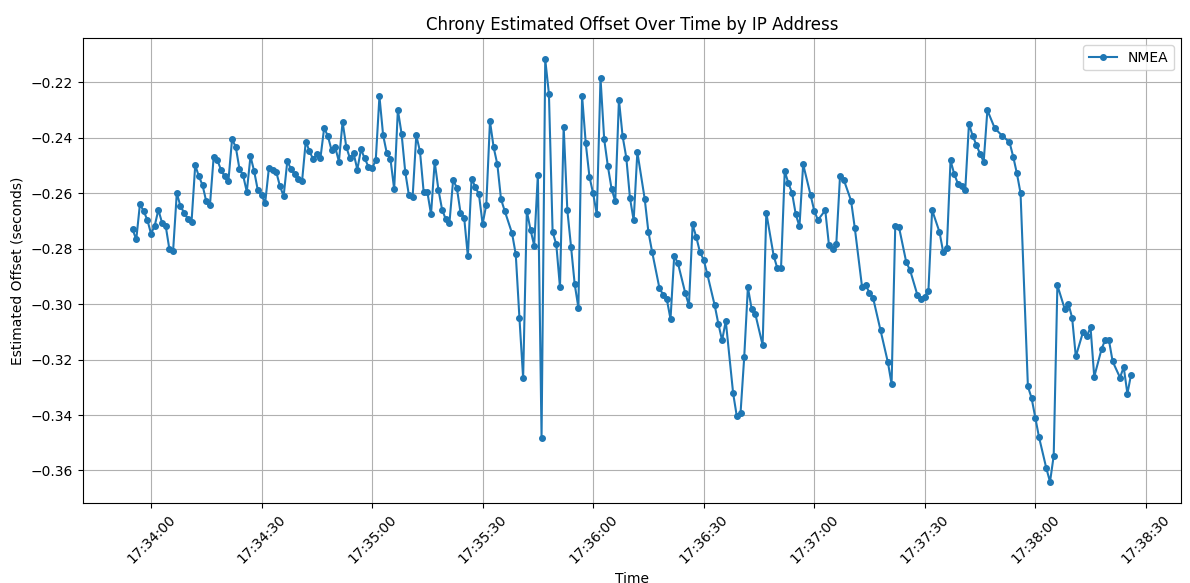
We get a pretty graph (and by pretty, I mean ugly – this is highly variable, with the slow 9600 default bits per second, the timing will actually be influenced by the number of seen/tracked satellites since we haven’t messed with what sentences are outputted) and some outputs.

matplotlib chart for chrony offset for NMEA source running at 9600 bps

And the avg/median offset:

Chrony Statistics Summary:
------------------------------
Number of IP Addresses: 1
Time Range: 2025-02-14 17:33:55 to 2025-02-14 17:38:26

Average Estimated Offset by IP:
NMEA: -2.71e-01

Median Estimated Offset by IP:
NMEA: -2.65e-01

So we need to pick a number here for the offset. They do not differ by much, 271 millseconds vs 265. Let’s just split the difference at 268. Very scientific. With this number, we can change the offset in the chrony config for the NMEA source. Make it positive to offset.

refclock SHM 0 refid NMEA offset 0.268 precision 1e-3 poll 0 filter 3

This usually works but I’m not getting good results so please refer to the previous post for how this should look. Turns out with the default sentences, some of the timing was attributed to 900-1000 milliseconds late, meaning the Pi was synchronizing to a full second late than actual. Couple options to resolve: increase baudrate, and reduce/eliminate unnecessary NMEA sentences. I increased the baudrate below, which won’t be necessary for any modules that have a baudrate higher than 9600 for default. If you don’t care about monitoring the GPS status, disable all sentences except for ZDA (time info).

I took an hour or so detour here to figure out how to change the baudrate on the MTK chip used in the Adafruit GPS module.

Long story short on the baudrate change:

austin@raspberrypi5:~ $ cat gps-baud-change.sh
#!/bin/bash

# Stop gpsd service and socket
sudo systemctl stop gpsd.service gpsd.socket

# Set the baud rate
sudo gpsctl -f -x "$PMTK251,38400*27\r\n" /dev/ttyAMA0


# Start gpsd back up
sudo systemctl start gpsd.service
#gpsd -n -s 38400 /dev/ttyAMA0 /dev/pps0

sudo systemctl restart chrony

How to automate this via systemd or whatever is the topic for another post. The GPS module will keep the baudrate setting until it loses power (so it’ll persist through a Pi reboot!).

Turns out that the offset needs to be 511 milliseconds for my Pi/Adafruit GPS at 38400 bps:

austin@raspberrypi5:~ $ sudo cat /etc/chrony/chrony.conf
refclock SHM 0 refid NMEA offset 0.511 precision 1e-3 poll 2
refclock PPS /dev/pps0 refid PPS lock NMEA poll 2 trust

Reboot and wait a few minutes.

7 – verify Chrony is using PPS and NMEA

Now we can check what Chrony is using for sources with

chronyc sources
# or if you want to watch it change as it happens
watch -n 1 chronyc sources
chronyc sources showing a lock on PPS (denoted with *) and false ticker on NMEA (denoted with x), which is the expected and desired status after a couple minutes

Many people asked how to get both time/NMEA and PPS from a single GPS receiver (i.e. without a 3rd source) and this is how. The keys are the lock directive as well as the trust directive on the PPS source.

8 – results

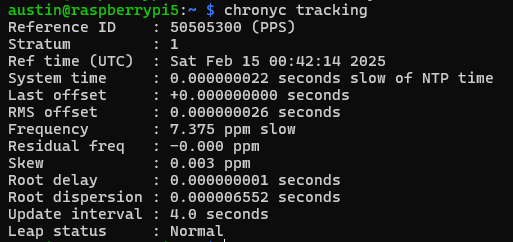
Check what chrony thinks of the system clock with

chronyc tracking

Here we see a few key items:

  • System time – this is updated every second with what Chrony thinks the time vs what the system time is, we are showing 64 nanoseconds
  • Last offset – how far off the system clock was at last update (from whatever source is selected). I got lucky with this capture, which shows 0 nanoseconds off
  • RMS offset – a long term average of error. I expect this to get to low double-digit nanoseconds. Decreasing further is the topic of the next post.
  • Frequency – the drift of the system clock. This number can kind of be whatever, as long as it is stable, but the closer to zero, the better. There is always a temperature correlation with the oscillator temperature vs frequency. This is what chrony is constantly correcting.
  • Residual frequency – difference from what the frequency is and what it should be (as determined by the selected source)
  • Skew – error in the frequency – lower is better. Less than 0.05 is very stable.
  • Root delay/dispersion – basically how far from the “source” of truth your chrony is
  • Update interval – self explanatory

9 – Grafana dashboard showing Chrony stats

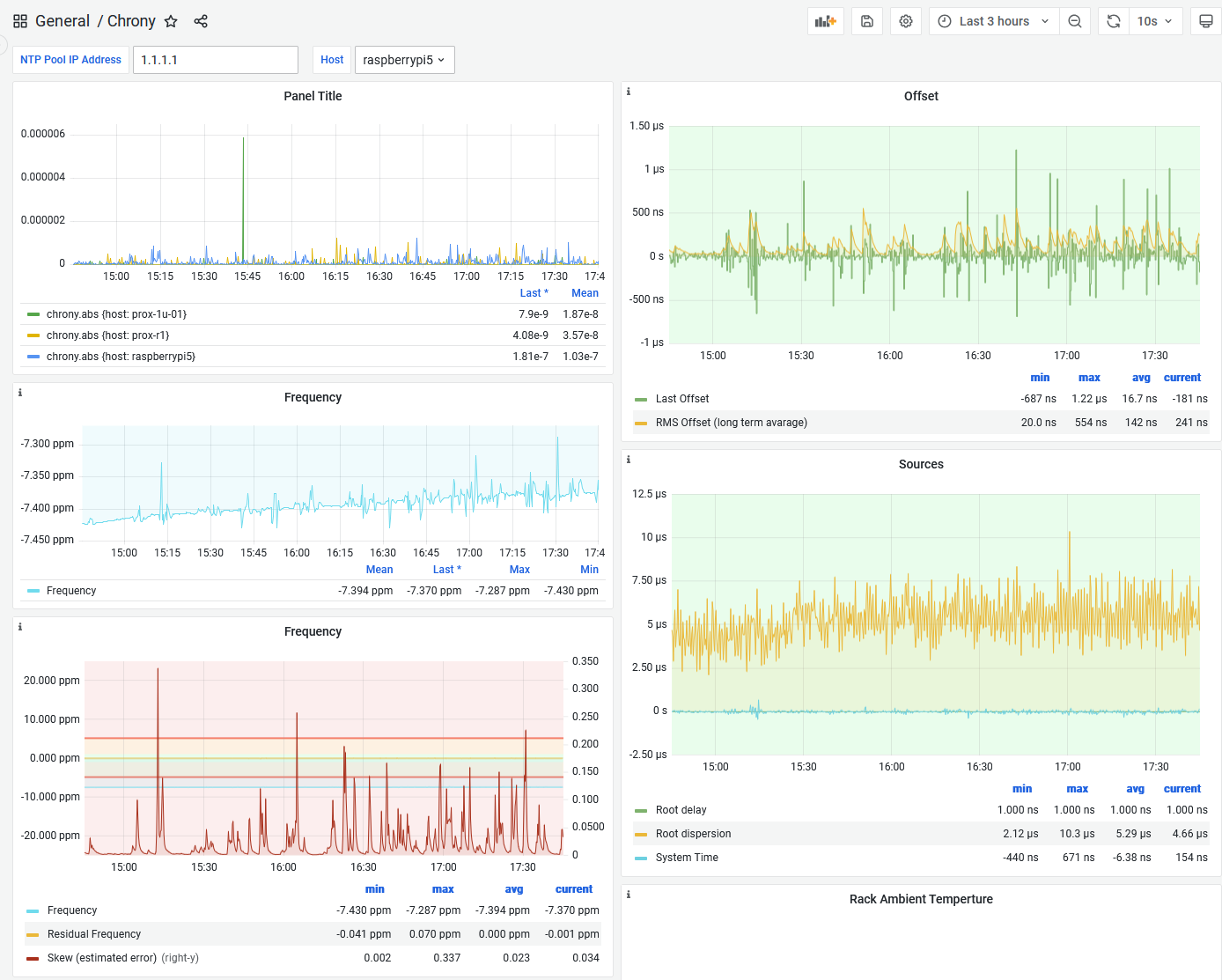
And to track the results over time, I feed the Chrony data to InfluxDB via Telegraf. Another topic for a future post. The dashboard looks like this:

Here we can see a gradual increase in the frequency on the Raspberry Pi 5 system clock. The offsets are almost always within 1 microsecond, with average of 16.7 nanoseconds. The spikes in skew correspond to the spikes in offsets. Something is happening on the Pi to probably spike CPU loading (even though I have the CPU throttled to powersave mode), which speeds things up and affects the timing via either powerstate transitions or oscillator temperature changes or both.

Conclusion

In 2025, a GPS sending PPS to Raspberry Pi is still a great way to get super accurate time. In this Chrony config, I showed how to get time of day, as well as precision seconds without an external source. Our offsets are well under one microsecond.

In the next post, we will examine how to maximize the performance (by minimizing the frequency skew!) of our Raspberry Pi/PPS combination – World’s Most Stable Raspberry Pi? 81% Better NTP with Thermal Management.

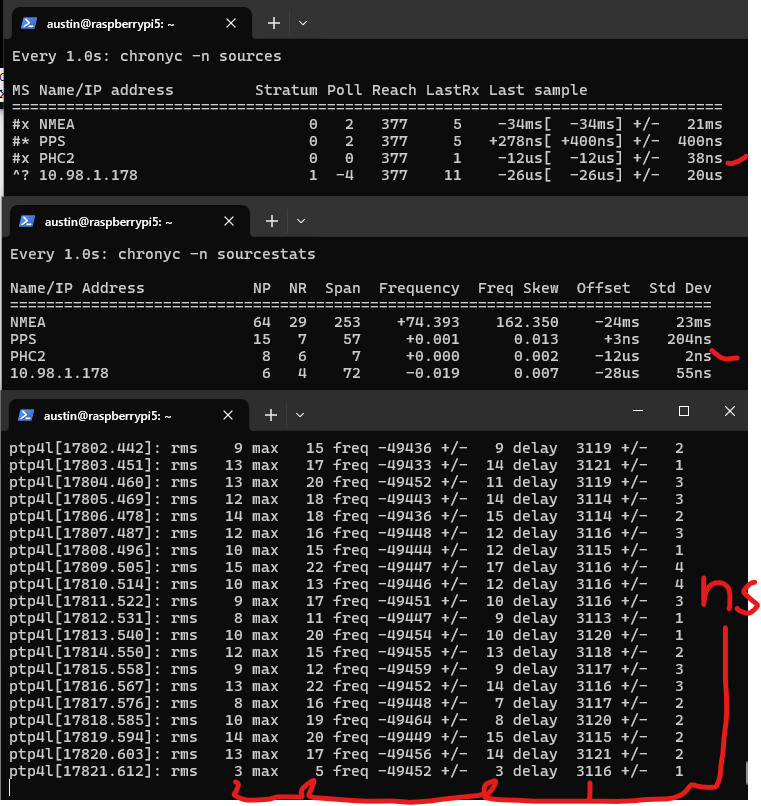
And for the post after that – here’s a preview of using PTP from an Oscilloquartz OSA 5401 SyncPlug. Note the standard deviations and offsets. This device has a OCXO – oven controlled crystal oscillator – that has frequency stability measured in ppb (parts per billion). It also has a NEO-M8T timing chip, the same one I mentioned in the beginning of this post.

screenshot showing three terminals up – 1) chrony sources, with a PHC (physical hardware clock) in the NIC. error is shown as +/- 38 nanoseconds. 2) chrony source stats, showing a standard deviation of 2 nanoseconds for that same source and 3) linuxptp synchronizing the PHC from the OSA 5401 SyncPlug with all numbers shown in nanoseconds. rms is error of the PHC from the SyncPlug, max is max offset, freq is pretty bad for this oscillator at -49xxx PPM, delay is ethernet delay (3.1 microseconds)

The OSA 5401 SyncPlug is quite difficult to come by (I scored mine for $20 – shoutout to the servethehome.com forums! this device likely had a list price in the thousands) so I’ll also show how to just set up a PTP grandmaster (that’s the official term) on your Raspberry Pi.

Next Steps